
LinkedIn Verification with Persona: Full Walkthrough
persona linkedin verification is an identity verification process that allows eligible LinkedIn members to confirm their identity through Persona, a third-party identity verification provider. If you’ve recently noticed the option to verify your LinkedIn profile, you might be wondering how the process works, what documents you need, and whether your personal information is safe.
For many professionals, verification is becoming an important part of building confidence online. Recruiters, potential clients, and business partners often review LinkedIn profiles before starting conversations. A verified identity can provide an additional signal that a profile represents a real person.
However, completing verification isn’t always straightforward.
Some users encounter document rejection errors, camera permission problems, or verification sessions that never finish. Others are unsure whether Persona supports their country or identification documents.
The good news is that eligible members can often complete the required steps without complicated technical knowledge.
This guide explains the verification process, eligibility requirements, document preparation, privacy considerations, and troubleshooting methods. You’ll also learn what to do if verification fails and how to avoid common mistakes.
What Is Persona LinkedIn Verification?
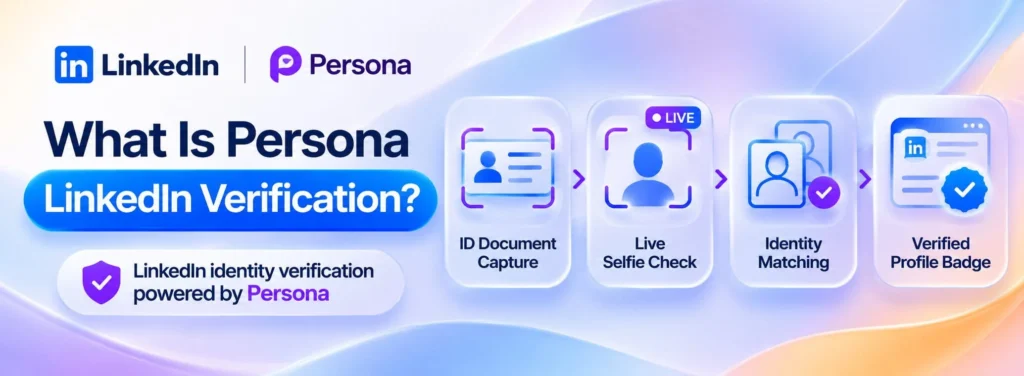
persona linkedin verification refers to an identity confirmation process in which LinkedIn uses Persona’s verification technology to help eligible members verify their identities.
Persona is an identity verification service that helps organizations check identity information using supported documents and verification technologies.
When LinkedIn offers Persona as a verification method, members may be directed through a process that includes document capture, identity matching, and other checks.
The exact steps depend on the verification experience available to the member.
How Does Persona Work With LinkedIn?
The process generally begins inside LinkedIn.
An eligible member selects an identity verification option and follows the instructions provided.
If Persona is the available provider, the member may be directed to a Persona-powered verification interface.
Depending on the requirements, the process can involve submitting an identification document and completing a live selfie check.
Persona evaluates the information according to the applicable verification requirements.
A successful result may allow LinkedIn to display identity verification information on the member’s profile.
Why Does LinkedIn Use Third-Party Verification Providers?
Identity verification requires specialized technology and processes.
Third-party providers can support document authentication, identity matching, and other checks.
Using an external provider doesn’t automatically mean a verification process is unsafe.
However, it does mean users should understand which organization processes their information and review the applicable privacy notices.
Is Persona Verification Mandatory?
Optional profile verification isn’t universally mandatory for LinkedIn members.
However, LinkedIn may separately require identity confirmation during certain account recovery or security procedures.
These situations should not be confused.
A member choosing to obtain a profile verification indicator may follow a different process from someone attempting to recover a restricted account.
Why Should You Verify Your LinkedIn Account?
Before starting linkedin verification with persona, it’s useful to understand what verification can and cannot accomplish.
Verification is intended to provide additional confidence in specific identity information.
It doesn’t guarantee professional competence, honesty, or better networking results.
Nevertheless, it may complement a credible professional profile.
Build Confidence With Professional Connections
LinkedIn brings together professionals who frequently communicate without meeting in person.
A verified identity may help unfamiliar contacts feel more comfortable knowing that an approved verification process has been completed.
For example, a potential client researching an independent consultant may appreciate seeing identity confirmation alongside relevant experience.
However, the client should still evaluate the consultant’s work independently.
Support Your Professional Reputation
A strong professional reputation develops through accurate information, relevant experience, and consistent communication.
Verification can complement these qualities.
It may be particularly useful for freelancers, recruiters, consultants, and professionals who regularly connect with unfamiliar people.
Improve Profile Authenticity
Verification helps distinguish between a profile that has completed an eligible identity check and one that hasn’t.
However, an unverified profile isn’t automatically fraudulent.
Some legitimate professionals simply don’t have access to an eligible verification method.
Does Verification Improve LinkedIn Rankings?
There is no universal guarantee that verification improves LinkedIn search rankings, increases profile views, or generates more business opportunities.
LinkedIn’s ranking systems consider multiple factors.
Verification should be treated as an identity-related trust signal rather than a guaranteed visibility strategy.
Requirements for Persona LinkedIn Verification
Before beginning persona linkedin verification, review the requirements displayed in your LinkedIn account.
Verification eligibility can vary by country, account, document type, and provider availability.
Not every LinkedIn member will see Persona as an available option.
Supported Identification Documents
Persona-powered verification may require an eligible government-issued identification document.
Depending on the specific process, supported documents may include certain passports or other government-issued identification.
However, document eligibility varies.
A document accepted through one verification flow may not qualify through another.
Always follow the document requirements shown during your actual verification session.
Device and Camera Requirements
Some verification methods require a smartphone with a functioning camera.
You may need to capture your identification document and complete a selfie check.
Make sure your device supports the requested process.
Camera permissions must also be enabled when required.
An updated operating system and browser can help reduce compatibility problems.
Account Information Requirements
Your LinkedIn account should contain accurate information.
Identity verification may involve comparing submitted identity details with information associated with your account.
Legitimate differences involving preferred names, legal names, or name changes may require additional consideration.
Don’t alter accurate information simply to force a verification result.
Country and Regional Availability
Verification methods aren’t available uniformly worldwide.
Some countries may have different document requirements or verification providers.
If Persona isn’t offered through your LinkedIn account, another method may be available.
If no eligible method appears, consult LinkedIn’s current Help Center guidance.
Do You Need LinkedIn Premium?
Standard LinkedIn profile verification is free for eligible members.
You don’t generally need LinkedIn Premium to complete an available verification method.
Premium subscriptions and identity verification serve different purposes.
Be cautious of anyone claiming that paying for an unofficial service guarantees verification approval.
LinkedIn Verification with Persona: Step-by-Step Walkthrough
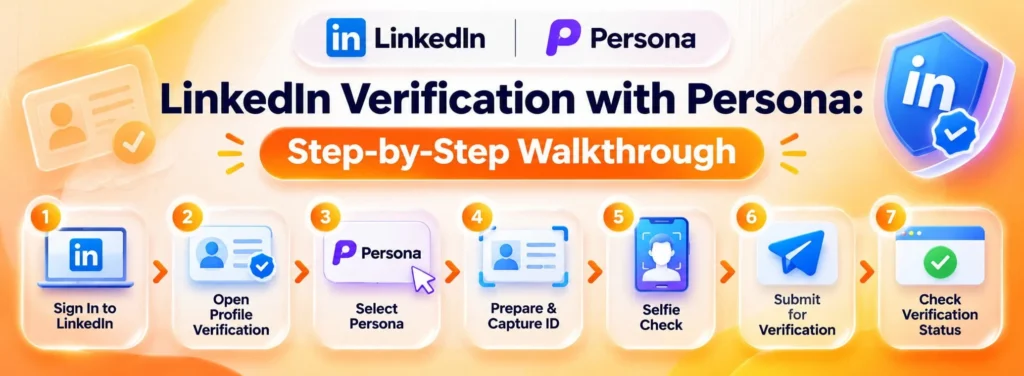
Completing linkedin verification with persona generally involves several stages, from opening your LinkedIn profile to submitting the requested identity information.
The following walkthrough describes the typical process.
Actual screens and requirements may differ depending on your device, location, and account eligibility.
Step 1: Sign In to Your LinkedIn Account
Open LinkedIn through its official website or mobile application.
Sign in using your account credentials.
Make sure you’re accessing the correct profile.
If LinkedIn requests an additional security check, complete it before proceeding.
Avoid starting verification through links sent by unfamiliar individuals.
Step 2: Open Your Profile Verification Options
Navigate to your LinkedIn profile.
Look for an available verification option, which may appear as a verification section or a button such as “Verify now.”
The exact wording and placement can change as LinkedIn updates its interface.
If you cannot locate the option, consult the official Help Center.
Not seeing Persona doesn’t necessarily mean something is wrong with your account.
Step 3: Select the Available Identity Verification Method
If Persona appears as an eligible identity verification provider, follow the instructions to begin.
Review the information displayed before continuing.
The interface may explain what documents are required and how your information will be processed.
Read the relevant privacy disclosures before submitting sensitive identification details.
Step 4: Prepare Your Identification Document
Have your eligible identification document ready.
Check that it is valid, readable, and supported.
Avoid using damaged documents or photographs with important details obscured.
If electronic document reading is required, follow the specific instructions provided.
Don’t assume that every verification method accepts ordinary document photographs.
Step 5: Capture Your Document
Follow the on-screen instructions to capture your identification.
Position the document within the camera frame.
Use sufficient lighting and avoid reflections that make text difficult to read.
Keep the camera steady.
If the process requests a live capture, don’t substitute a screenshot or previously edited photograph.
Step 6: Complete the Selfie Verification
Some Persona verification experiences require a selfie or additional facial verification.
Follow the instructions carefully.
Position your face clearly within the camera frame and avoid unnecessary filters.
The provider may use facial comparison or other checks to evaluate the submitted information.
Not every verification flow uses identical technology.
Step 7: Submit Your Verification Request
After completing the required checks, submit the verification information through the authorized interface.
Avoid closing the session before receiving confirmation that your submission has been completed.
If an error appears, record its exact wording.
Repeatedly restarting without understanding the issue may not help.
Step 8: Check Your LinkedIn Verification Status
Return to LinkedIn and review the available verification status.
A successful verification may result in relevant confirmation information appearing on your profile.
Some submissions may require additional processing.
If the status remains pending, follow the instructions displayed.
How Long Does the Process Take?
The submission steps may take only a few minutes when everything works correctly.
However, approval time varies.
Document compatibility, provider processing, and additional review requirements can affect the result.
There is no universal guarantee that every verification attempt will be approved immediately.
Persona LinkedIn Verification Not Working? Common Problems and Fixes
If persona linkedin verification not working describes your experience, identifying the exact stage where the process fails is the best starting point.
A failed verification attempt doesn’t automatically mean your identification is invalid or your LinkedIn account has been restricted.
Technical errors, unsupported documents, and incomplete sessions can produce similar symptoms.
Problem 1: Persona Rejects Your Identification Document
Document rejection is a common concern during identity verification.
Possible causes include unsupported document types, expired identification, poor image quality, or unsuccessful document checks.
How to Fix Document Rejection
Review the document requirements shown in your verification session.
Confirm that your document is eligible and hasn’t expired.
If the process involves camera capture, make sure all required details are visible.
Avoid reflections, blurred images, and cropped edges.
If another document type is officially supported, consider using it.
Don’t submit altered identification information.
Problem 2: Camera Verification Keeps Failing
Camera problems may prevent the verification interface from capturing documents or selfies.
Sometimes the camera displays a blank screen.
Other times, the process becomes stuck after requesting permission.
How to Fix Camera Errors
Check your browser or application permissions.
Make sure the camera is available to the verification interface.
Close other applications that might be using it.
Update your browser and restart your device if necessary.
If LinkedIn recommends a particular device or browser, follow those instructions.
Problem 3: Verification Gets Stuck on Loading
A persona linkedin verification not working error may appear as a loading screen that never finishes.
This can happen because of an unstable internet connection, interrupted session, browser incompatibility, or temporary service issue.
Try using a stable network and a supported browser.
Disable extensions that interfere with essential website functions, if appropriate.
If the process still fails, record the error and consult official support.
Problem 4: Verification Link Has Expired
Some verification sessions use time-sensitive links.
If you return to an old session, the link may no longer work.
Start a new session through LinkedIn’s official verification interface when that option is available.
Avoid repeatedly opening expired links.
If your account is restricted, use the recovery instructions associated with the restriction notice.
Problem 5: Selfie Verification Is Rejected
Selfie verification can fail when the provider cannot complete the required identity comparison.
Possible contributing factors include poor lighting, unclear images, or failure to follow capture instructions.
Use a well-lit environment and position your face as requested.
Avoid filters or accessories that interfere with required facial visibility.
If repeated attempts fail, follow the provider’s available review or support process.
Problem 6: Verification Succeeds but No Badge Appears
Sometimes, the identity check appears successful, but LinkedIn doesn’t immediately display the expected verification information.
Check whether the provider confirmed completion and whether LinkedIn shows an updated status.
Remember that verification indicators may appear differently depending on the interface and verification type.
If the result remains missing, contact LinkedIn through its official support options.
Is LinkedIn Verification with Persona Safe?
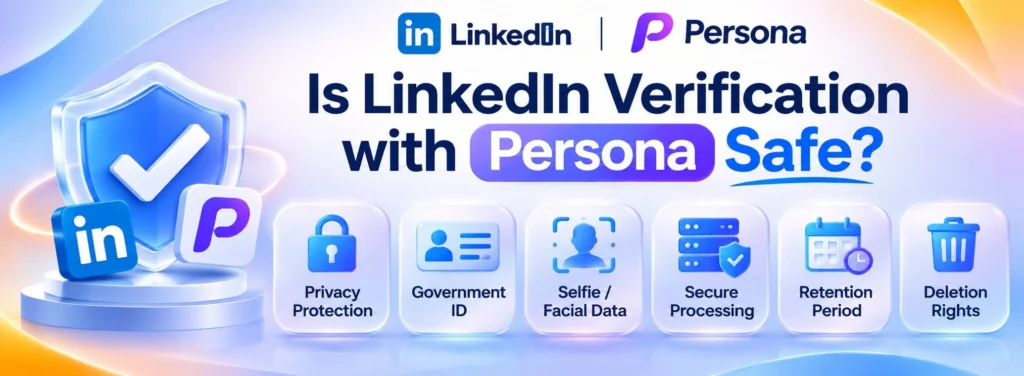
Privacy is an important consideration before completing linkedin verification with persona.
Identity verification may involve sensitive information, including government identification and facial images.
Although Persona provides legitimate identity verification services, users should understand the applicable data-processing practices before participating.
What Information May Persona Collect?
Depending on the verification method, information may include identifying details from your document, document images, selfie images, and technical information associated with the verification session.
Some processes may also involve biometric information or facial comparison.
The exact categories depend on the service and configuration.
Does LinkedIn Receive Your Entire ID?
Don’t assume that LinkedIn automatically receives every document or image processed by Persona.
The information exchanged depends on the specific verification integration and its privacy terms.
Likewise, don’t assume that no personal information is shared.
Review the relevant privacy notices to understand what LinkedIn receives.
How Long Is Your Information Stored?
Retention periods depend on the verification process, provider policies, and applicable legal requirements.
Some information may be deleted after a specified period.
Other records may be retained for security, operational, or compliance purposes.
Consult the current privacy documentation rather than relying on an unsupported universal deletion timeframe.
Can You Request Deletion?
Depending on applicable privacy laws and provider policies, you may have rights to request access to or deletion of certain personal information.
Some records may be subject to retention exceptions.
Use the official privacy request procedures provided by LinkedIn or Persona.
Never send sensitive documents to an unofficial account claiming to handle deletion requests.
How to Avoid Persona Verification Problems
Preparing carefully can reduce preventable errors during persona linkedin verification.
Although preparation cannot guarantee approval, it can make the process easier.
Check Your Eligibility First
Confirm that Persona is actually offered through your LinkedIn account.
Review the supported countries, identification documents, and technical requirements.
Don’t follow instructions intended for a different provider.
Use Accurate Information
Make sure your LinkedIn profile reflects your genuine professional identity.
If you notice incorrect information, review the platform’s guidance before making changes.
Avoid repeatedly changing names or other identity details simply to obtain approval.
Prepare a Suitable Environment
Choose a location with good lighting.
Use a stable internet connection and a compatible device.
Keep your identification document ready.
Make sure you can complete the process without unnecessary interruptions.
Protect Your Personal Information
Begin verification through LinkedIn’s official interface.
Read the relevant privacy notices.
Avoid sharing identification documents through private messages or unfamiliar websites.
If a message requests payment for guaranteed verification, treat it cautiously.
Persona Verification vs. Other LinkedIn Verification Methods
Not every member needs to use Persona.
LinkedIn may offer different verification methods depending on location, employer participation, and account eligibility.
Understanding the differences can help you select an appropriate option.
Persona Identity Verification
Persona may support identity verification using eligible identification documents and additional checks.
Its purpose is to confirm identity information through the applicable verification process.
The precise requirements depend on the method offered.
Workplace Email Verification
Eligible members may verify a workplace association using an approved company email address.
This method focuses on employment affiliation rather than completing the same identity checks used by government-ID verification.
Not every employer or email domain is eligible.
Organization-Supported Verification
Some employers may support verification through approved organizational identity systems.
Availability depends on the employer’s participation and technical setup.
Which Verification Method Is Better?
The best method depends on what you need to confirm.
Identity verification and workplace verification establish different attributes.
If several methods are available, compare their requirements, privacy implications, and relevance to your professional goals.
Choose an officially supported option that you can legitimately complete.
Frequently Asked Questions About Persona LinkedIn Verification
Is Persona LinkedIn Verification Free?
Yes. Standard persona linkedin verification through LinkedIn is free for eligible members.
You don’t generally need a LinkedIn Premium subscription.
However, verification availability depends on your account, location, and supported methods.
Why Is Persona LinkedIn Verification Not Working?
If persona linkedin verification not working is the issue you’re experiencing, possible causes include unsupported identification, camera permission errors, expired sessions, or technical difficulties.
Check the exact error message and follow the instructions provided.
If the problem continues, contact official support.
Can I Complete LinkedIn Verification Without Persona?
Yes, if your account offers another eligible verification method.
Workplace verification or a different supported identity provider may be available.
However, you cannot assume that every account has alternative options.
Is LinkedIn Verification with Persona Mandatory?
No. Optional linkedin verification with persona isn’t mandatory for every LinkedIn member.
However, separate identity checks may be required in certain account-security or recovery situations.
Follow the instructions relevant to your specific account.
Can I Retry Persona Verification After Failure?
Retry availability depends on the reason for failure and the instructions displayed.
Some errors can be corrected before another attempt.
Other situations may require additional review or support.
Avoid repeatedly submitting the same information without addressing the underlying issue.
Does Persona Verification Guarantee a LinkedIn Badge?
No. Completing the submission steps doesn’t guarantee approval.
The verification must satisfy the applicable requirements.
If successful, LinkedIn may display the relevant verification information on your profile.
Final Thoughts: Complete LinkedIn Verification with Confidence
Completing persona linkedin verification can be a straightforward way for eligible professionals to confirm their identity on LinkedIn.
The process generally involves selecting an available verification method, preparing supported identification, completing the required identity checks, and reviewing the final status.
However, eligibility and approval aren’t guaranteed.
If you encounter persona linkedin verification not working, focus on identifying the exact issue rather than repeatedly restarting the process.
Document compatibility, camera permissions, expired sessions, and temporary technical problems are all worth checking.
Before sharing identification information, review the relevant privacy policies and use only official verification channels.
Ultimately, linkedin verification with persona can provide an additional identity trust signal, but it doesn’t replace professional experience, accurate profile information, or meaningful networking.


