How to Use LinkedIn Sales Navigator: Step-by-Step for Beginners
how to use linkedin sales navigator is one of the most valuable skills for professionals who want to find potential customers, build meaningful business relationships, and improve their B2B sales results. Instead of spending hours searching through ordinary LinkedIn profiles, Sales Navigator provides specialized tools for identifying decision-makers, researching companies, and managing sales opportunities.
However, beginners often struggle with understanding its dashboard, applying search filters, saving prospects, and starting conversations. Without a clear strategy, even powerful sales tools can become confusing and difficult to manage.
This comprehensive guide explains everything from setting up your account to finding qualified leads, sending personalized messages, and measuring your prospecting performance.
Whether you are a freelancer, sales representative, marketing professional, business owner, or entrepreneur, you will discover practical techniques for turning LinkedIn into an organized prospecting platform.
What Is LinkedIn Sales Navigator?
LinkedIn Sales Navigator is a premium sales intelligence platform designed to help professionals discover, understand, and connect with potential customers.
Unlike standard LinkedIn, which primarily focuses on professional networking, Sales Navigator offers advanced prospecting capabilities that support targeted business development.
Its features help users identify relevant companies, locate influential employees, monitor business activities, and discover opportunities for meaningful conversations.
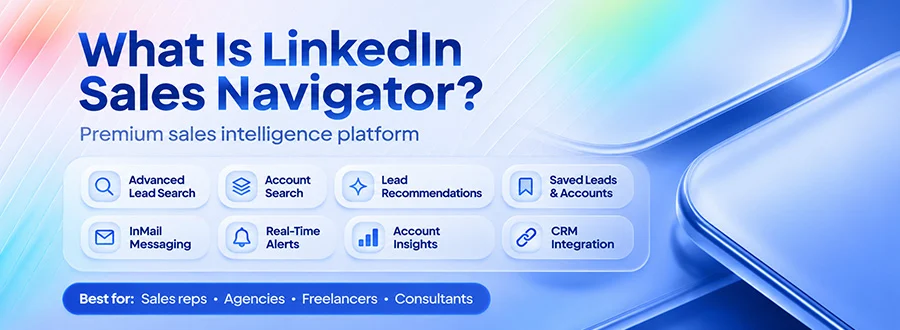
Key Features of LinkedIn Sales Navigator
Some important capabilities include:
- Advanced Lead Search: Find professionals using targeted search filters.
- Account Search: Discover businesses that match your ideal customer profile.
- Lead Recommendations: Identify additional prospects based on your activity.
- Saved Leads and Accounts: Organize important contacts and companies.
- InMail Messaging: Contact eligible LinkedIn members outside your existing network.
- Real-Time Alerts: Monitor relevant professional and company updates.
- Account Insights: Research organizations before approaching their employees.
- CRM Integration: Connect supported customer relationship management systems, depending on your subscription.
These capabilities make the platform useful for businesses that depend on accurate targeting and relationship-driven sales.
Who Should Use LinkedIn Sales Navigator?
The platform can benefit several types of professionals.
Sales representatives use it to identify potential buyers and develop pipelines. Marketing agencies locate business owners who might need their services. Freelancers connect with relevant project managers, while consultants research organizations that could benefit from specialized expertise.
Recruitment and partnership professionals may also find its company research and networking capabilities useful, although dedicated recruiting tools serve different purposes.
The greatest advantage comes from having a clearly defined audience and a repeatable outreach process.
Step 1: Create Your LinkedIn Sales Navigator Account
Before learning how to use linkedin sales navigator effectively, you need an active LinkedIn account and access to an appropriate Sales Navigator subscription.
LinkedIn offers multiple subscription options with different collaboration and integration capabilities.
Choose the Right Sales Navigator Plan
The main subscription categories are:
Sales Navigator Core
Designed primarily for individual professionals who need advanced prospecting, lead tracking, and account research.
Sales Navigator Advanced
Designed for teams that need additional collaboration capabilities and shared sales intelligence.
Sales Navigator Advanced Plus
Provides more extensive CRM-related features and enterprise-oriented sales workflows.
Subscription features and pricing may change, so always review LinkedIn’s official plan comparison before purchasing.
For someone beginning independently, Core is often a practical starting point.
Complete Your Account Setup
Follow these steps:
- Visit the official LinkedIn Sales Navigator website.
- Review the available subscription options.
- Select the plan that matches your business requirements.
- Sign in with your existing LinkedIn credentials.
- Complete the subscription or invitation process.
- Follow any onboarding instructions displayed.
- Configure your initial sales preferences.
LinkedIn may ask questions about your role, target market, and sales activities to personalize recommendations.
Choose your answers carefully because relevant preferences can improve your initial prospecting experience.
Step 2: Understand the LinkedIn Sales Navigator Login Process
The linkedin sales navigator login process connects your existing LinkedIn identity with the specialized Sales Navigator interface.
You generally do not need to create an entirely separate professional profile.
How to Sign In to Sales Navigator
Start by visiting the official website:
https://www.linkedin.com/sales/
If necessary, sign in using the email address and password associated with your LinkedIn account.
After successful authentication, you should be directed to the Sales Navigator environment when your account has the required access.
Depending on your subscription and interface, you may also find an option to open Sales Navigator from LinkedIn.
Common Login Problems and Solutions
Some beginners experience difficulties accessing their subscription.
Incorrect credentials: Confirm that you are using the correct LinkedIn account and password.
Subscription not activated: Check whether your subscription or company-issued license has been activated.
Browser problems: Try updating your browser, checking cookies, or opening a fresh browser session.
Account verification: Complete any security verification requested by LinkedIn.
Company-managed access: Contact your organization’s administrator if your subscription was assigned through your employer.
If your linkedin sales navigator login continues to fail, visit LinkedIn’s official Help Center rather than relying on unofficial sign-in websites.
Protecting your credentials should always be a priority.
Step 3: Explore the Sales Navigator Dashboard
Once you access your account, spend time understanding the main dashboard.
For beginners exploring how to use linkedin sales navigator, dashboard familiarity reduces mistakes and makes everyday prospecting much easier.
The interface brings together search capabilities, saved prospects, account information, recommendations, and notifications.
Important Dashboard Sections
Home: Displays relevant updates, recommendations, and other sales intelligence.
Search: Helps discover people and companies using targeted criteria.
Leads: Provides access to saved professionals and related information.
Accounts: Organizes companies that you want to monitor or approach.
Lists: Helps group prospects around campaigns, territories, or specific business objectives.
Alerts: Highlights relevant changes involving saved leads and accounts.
Some navigation labels and capabilities vary depending on your subscription and LinkedIn’s interface updates.
Customize Your Prospecting Workspace
A well-organized workspace improves daily efficiency.
Begin by identifying your target industries, geographic markets, and ideal customer profiles. Save relevant companies and create meaningful prospect lists.
Avoid adding hundreds of unrelated contacts immediately.
Instead, establish a smaller collection of qualified prospects that you can research and approach thoughtfully.
Step 4: Define Your Ideal Customer Profile
Before searching for leads, clarify exactly who you want to reach.
An ideal customer profile, commonly called an ICP, describes the organizations most likely to benefit from your product or service.
Without this definition, prospecting can produce large numbers of contacts without meaningful business opportunities.
Identify Your Target Audience
Consider the following questions:
- Which industries need your solution?
- What company sizes can realistically afford your services?
- Which geographic markets do you serve?
- What business problems do your customers experience?
- Who typically influences purchasing decisions?
- Which job titles are relevant to your offering?
For example, a digital marketing agency offering local SEO services might target owners of established home service businesses in the United States.
Potential contacts could include founders, marketing directors, and business development managers.
Build a Simple Customer Profile
Imagine your business provides B2B software development services.
Your target audience might include technology companies with 11–200 employees, located in specific markets, and actively expanding their engineering operations.
Likely decision-makers could include CTOs, technology directors, or founders.
This preparation transforms a broad search into a focused prospecting strategy.
Step 5: Find Qualified Leads Using Advanced Search
Advanced search is one of the most important features to master when learning how to use linkedin sales navigator for lead generation.
Instead of entering random keywords and browsing unrelated profiles, use filters to narrow your audience.
How to Perform a Lead Search
Open Sales Navigator and select the lead search option.
Enter a relevant keyword or start with the available filters.
Depending on the interface and available data, you can refine results using criteria such as:
- Geography
- Current company
- Industry
- Job title
- Seniority level
- Company headcount
- Function
- Connection relationship
- Account lists
LinkedIn recommends beginning with a manageable number of filters before adding more specific conditions.
Example: Finding Marketing Decision-Makers
Suppose you sell marketing automation services.
Start by selecting your target country, such as the United States.
Next, identify relevant industries and narrow the results by professional roles, such as Marketing Director or Head of Marketing.
You can then refine your search using company characteristics.
Review the returned profiles and check whether the individuals match your target customer definition.
Avoid Overfiltering Your Results
Using too many filters can eliminate valuable prospects.
Begin with two or three high-priority criteria and evaluate the results.
Add further conditions only when the audience remains too broad.
A smaller group of relevant prospects usually provides greater value than an enormous collection of unrelated profiles.
Step 6: Use Account Search to Find Target Companies
Lead search focuses on people, while account search focuses on organizations.
Understanding this distinction is essential for building a structured business development process.
Search for Companies That Match Your Market
Open the account search interface and apply relevant company filters.
You can research organizations using available criteria such as geography, industry, company size, and other supported characteristics.
For example, an IT consulting agency might search for mid-sized healthcare companies in Florida.
After identifying suitable businesses, examine their company information and relevant employees.
Evaluate Companies Before Contacting Them
Review each organization’s activities and business context.
Look for indications of expansion, hiring, new initiatives, leadership changes, or operational challenges related to your offering.
A company actively investing in technology may be more relevant to a software consulting business than one with no apparent need.
Save promising organizations for future research.
This account-focused approach helps establish a clear connection between your services and potential customer needs.
Step 7: Save and Organize Your Leads
One of the most practical lessons in linkedin sales navigator training is learning to organize prospect information properly.
Finding relevant contacts is useful, but maintaining a structured prospecting system is what makes those discoveries actionable.
How to Save a Lead
When you discover a promising professional, open their profile or use the available save option.
Add that person to your saved leads.
Repeat the process for other qualified contacts.
You can organize relevant contacts into custom lists where supported.
Create Lists Based on Business Objectives
For example, a marketing agency could create lists for:
- Healthcare Decision-Makers
- Real Estate Business Owners
- SaaS Marketing Directors
- Florida Business Prospects
- High-Priority Follow-Ups
Use descriptive names that make each list easy to recognize.
Prioritize Lead Quality
Saving contacts does not automatically mean they are qualified.
Evaluate whether each person works at a suitable company, has influence over the problem you solve, and has a realistic reason to consider your offering.
Maintain consistent qualification standards.
This reduces unnecessary outreach and helps keep your pipeline manageable.
Step 8: Save Searches and Monitor New Opportunities
A major benefit of understanding how to use linkedin sales navigator is the ability to avoid repeating the same searches manually.
Sales Navigator allows users to save search criteria and monitor newly matching results.
How Saved Searches Work
After applying your preferred filters, locate the option to save the search.
Give it a descriptive name reflecting the audience.
For example, you might save a search called “US SaaS Founders – Mid-Sized Companies.”
LinkedIn can then notify you when new leads or accounts match the saved criteria.
Why Saved Searches Matter
Saved searches help establish a consistent prospecting workflow.
Instead of rebuilding complicated searches every morning, you can revisit existing audience segments.
They are especially valuable when researching growing markets or industries where professionals frequently change roles.
Review saved searches periodically because business priorities and market conditions can change.
Step 9: Use Lead Alerts to Identify the Right Outreach Moment
Sales Navigator offers alerts that help users recognize potentially useful changes involving relevant people and companies.
These signals can improve the timing and relevance of outreach.
Important Alerts to Monitor
Examples include professional job changes, promotions, relevant posts, company developments, and other available account signals.
Not every alert indicates purchasing interest.
However, these updates can provide meaningful context for a personalized conversation.
Turn Alerts Into Conversation Opportunities
Imagine a marketing director joins a growing software company.
Instead of immediately sending a generic sales pitch, you could congratulate them on their new position and reference an industry challenge relevant to their responsibilities.
Similarly, if a prospect publishes an insightful post, you could engage with the content before sending a connection request.
This relationship-focused method generally feels more natural than approaching strangers without context.
Effective linkedin sales navigator training should teach users how to interpret signals rather than treating every notification as a reason to sell.
Step 10: Send Personalized Connection Requests
Learning how to use linkedin sales navigator also involves knowing how to approach potential customers professionally.
Finding the right person is only the beginning.
Your message determines whether the prospect sees your outreach as relevant or unwanted.
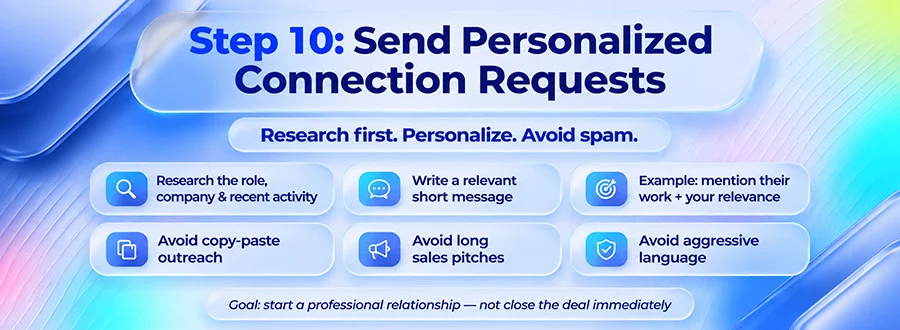
Research Before Sending a Request
Review the person’s current role, company, professional interests, and recent activity.
Look for a genuine connection between their responsibilities and your expertise.
Avoid exaggerated compliments or claims that you have researched someone extensively when you have not.
Example of a Personalized Connection Message
Hi Sarah, I noticed your work in SaaS marketing and found your recent insights on customer acquisition interesting. I work with growing businesses on digital marketing strategies and would be glad to connect.
This message introduces your relevance without immediately demanding a meeting.
What to Avoid
Do not send identical messages to every prospect.
Avoid lengthy service descriptions, aggressive sales language, and misleading personalization.
A connection request should establish the beginning of a professional relationship, not attempt to close a deal immediately.
Step 11: Understand InMail and Direct Outreach
InMail allows eligible Sales Navigator subscribers to message certain LinkedIn members without an existing first-degree connection.
This capability can be useful when you identify a relevant decision-maker but cannot reach them through your current network.
How to Send an Effective InMail
Start with a clear, specific subject.
Introduce yourself briefly and explain why the conversation is relevant.
Mention a business challenge or opportunity connected to the recipient’s role.
Finish with a simple, low-pressure question.
For example:
Subject: Quick Question About Your Sales Process
Hi Michael,
I noticed your company is expanding its sales operations. I help B2B teams improve prospect research and outreach efficiency.
Would it be useful to exchange a few ideas about streamlining lead qualification?
Best regards,
Alex
Use Your InMail Credits Carefully
LinkedIn’s listed Sales Navigator plans include monthly InMail credits, subject to the platform’s applicable rules.
Always check your account for current availability and usage details.
Avoid wasting credits on poorly researched contacts.
A thoughtful message to a relevant buyer is more valuable than repeatedly contacting people with no apparent interest.
Step 12: Use Lead and Account Insights
Another important element of linkedin sales navigator training is understanding the research information available before contacting a prospect.
Lead and account insights can help you identify business context, relevant stakeholders, and possible conversation opportunities.
Research Individual Leads
Examine the professional’s responsibilities, career history, shared connections, and available activity.
Consider what challenges someone in that position might reasonably face.
For example, a newly appointed operations director may be evaluating existing processes.
That possibility can help inform your research, but it should not be treated as proof of an immediate purchasing need.
Research Target Accounts
Account pages can provide company information, relevant personnel, and other insights.
Where available, features such as Account IQ and Lead IQ may assist with research using AI-generated summaries.
Verify important information before referencing it in a message or sales presentation.
Better research helps produce more informed conversations, stronger discovery questions, and more relevant proposals.
Step 13: Connect Sales Navigator With Your CRM
CRM integration can help businesses connect prospecting activities with existing customer relationship management workflows.
However, integration capabilities depend on your subscription, CRM provider, and administrative configuration.
Why CRM Integration Is Useful
A connected workflow can reduce disconnected records and improve visibility into ongoing sales activity.
Sales teams may benefit from easier access to account context, shared customer information, and relevant prospecting insights.
Some advanced capabilities require specific enterprise-level subscriptions.
How to Approach Integration
First, confirm that your Sales Navigator plan supports the required functionality.
Next, check whether your CRM is supported and whether administrator permissions are necessary.
Follow LinkedIn’s official integration instructions rather than attempting unsupported connections.
Before enabling synchronization, establish clear internal rules for record ownership, duplication, and data quality.
If you use an individual subscription without CRM integration, you can still maintain a separate prospecting tracker while respecting LinkedIn’s data policies.
Step 14: Build a Consistent Daily Prospecting Routine
Understanding how to use linkedin sales navigator becomes more valuable when you translate the knowledge into repeatable daily activities.
Successful prospecting requires consistency, thoughtful research, and appropriate follow-up.
A Practical 30-Minute Routine
First 10 Minutes: Research
Review saved leads, account updates, and relevant search results.
Identify a small number of promising prospects.
Next 10 Minutes: Engage
Read relevant professional updates, contribute thoughtful comments, and send personalized connection requests where appropriate.
Final 10 Minutes: Follow Up
Review previous conversations, respond to messages, and update your prospecting records.
Track Meaningful Activities
Measure more than the number of connection requests sent.
Useful metrics include qualified leads identified, positive replies, meaningful conversations, meetings booked, and opportunities created.
Review these figures weekly.
If your response rate declines, examine your targeting and message relevance before increasing outreach volume.
Step 15: Improve Your Results With Advanced Prospecting Strategies
Once you understand the fundamentals, you can begin exploring more sophisticated techniques.
A structured linkedin sales navigator training approach should gradually introduce these methods after users become comfortable with basic search and lead management.
Use Account-Based Prospecting
Instead of targeting isolated professionals, identify suitable companies and research multiple relevant stakeholders.
For example, a software provider may need to understand both technical and financial decision-makers within the same organization.
Approaching the right stakeholders with role-specific information can improve the relevance of each conversation.
Explore Warm Introductions
Where available, shared connections and team relationship features may help identify a more natural introduction path.
A genuine introduction through a trusted professional relationship can provide useful context.
Never imply that a mutual connection has endorsed you unless that person has actually done so.
Combine Research With Helpful Content
Prospects may respond more positively when your professional profile demonstrates expertise.
Publish relevant insights, share useful case studies, and participate in discussions connected to your industry.
This gives potential buyers a clearer understanding of your capabilities before a conversation begins.
Step 16: Avoid Common Sales Navigator Mistakes
Even experienced professionals sometimes misuse prospecting tools.
Understanding how to use linkedin sales navigator correctly means recognizing habits that reduce efficiency and damage professional relationships.
Mistake 1: Targeting Everyone
Broad targeting often produces irrelevant conversations.
Define your ideal customers and prioritize qualified prospects.
Mistake 2: Sending Generic Messages
Copying identical messages without reviewing the recipient’s situation makes outreach less relevant.
Personalize messages using accurate, meaningful details.
Mistake 3: Ignoring Saved Leads
Saving hundreds of profiles without developing a follow-up process provides little practical value.
Review your lists regularly and remove outdated or unsuitable contacts.
Mistake 4: Focusing Only on Volume
High activity does not automatically create valuable opportunities.
Prioritize conversations and qualified pipeline development over vanity metrics.
Mistake 5: Using Unauthorized Automation
Avoid unauthorized scraping tools, aggressive automated messaging, or activities that violate LinkedIn’s policies.
Respect platform rules and the privacy of other members.
Sustainable prospecting depends on professional behavior and reliable information.
Step 17: Troubleshoot Common Sales Navigator Problems
Technical problems can interrupt your workflow, especially when you are unfamiliar with the interface.
Understanding basic troubleshooting techniques helps reduce unnecessary disruption.
Sales Navigator Is Not Opening
Confirm your subscription status and check whether you are signed into the correct LinkedIn account.
If the linkedin sales navigator login page repeatedly redirects you, verify browser settings, cookies, and account authentication.
Use LinkedIn’s official support resources when the problem persists.
Search Results Are Too Limited
Review the selected filters.
Remove unnecessary conditions and expand your geographic or company criteria where appropriate.
Also check whether your search terms are overly specific.
Saved Leads Are Difficult to Find
Review your saved lead sections and custom lists.
Use consistent naming conventions so important prospects remain easy to locate.
Notifications Are Not Relevant
Revisit saved leads, accounts, and search criteria.
Recommendations and alerts become more useful when the underlying prospecting strategy is properly targeted.
Step 18: Follow a Seven-Day Beginner Training Plan
A structured learning schedule can make linkedin sales navigator training easier to follow.
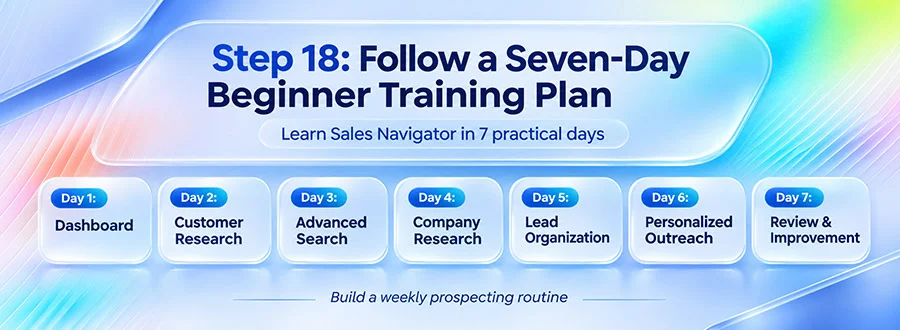
Instead of attempting every feature immediately, focus on one practical skill each day.
Day 1: Account and Dashboard
Activate your subscription, review the dashboard, and understand the main navigation areas.
Day 2: Customer Research
Define your ideal customer profile, target industries, geographic markets, and relevant decision-makers.
Day 3: Advanced Search
Practice creating lead searches with a few important filters.
Evaluate the quality of your results.
Day 4: Company Research
Use account search to identify organizations that fit your target market.
Day 5: Lead Organization
Save relevant contacts, create prospect lists, and establish consistent qualification standards.
Day 6: Personalized Outreach
Research selected prospects and prepare thoughtful connection requests or InMail messages.
Day 7: Review and Improvement
Evaluate your searches, saved leads, and early conversations.
Identify what needs adjustment and create a manageable weekly prospecting routine.
By the end of this process, you should understand the platform’s core workflow and have a foundation for continued improvement.
How to Measure Success With LinkedIn Sales Navigator
Knowing how to use linkedin sales navigator is not enough unless your prospecting activities contribute to meaningful business outcomes.
Measure performance using indicators connected to actual sales progress.
Lead Qualification Rate
Track the percentage of researched prospects who match your ideal customer criteria.
This reveals whether your search strategy is producing relevant contacts.
Positive Response Rate
Monitor how many prospects respond with genuine interest or engage in a useful discussion.
A low response rate may indicate unclear messaging, poor timing, or unsuitable targeting.
Meetings and Opportunities
Record the number of qualified meetings generated through your outreach.
Then examine how many conversations develop into legitimate sales opportunities.
Pipeline Contribution
Evaluate whether Sales Navigator helps generate potential revenue, improves account knowledge, or reduces the effort required to identify appropriate buyers.
These outcomes provide a more useful performance picture than activity counts alone.
Frequently Asked Questions About LinkedIn Sales Navigator
1. Is LinkedIn Sales Navigator suitable for beginners?
Yes. Beginners can start with basic lead searches, saved contacts, and simple account research.
The most important requirement is understanding your target audience before approaching potential customers.
2. How do I access my Sales Navigator account?
Use the official linkedin sales navigator login process through your LinkedIn credentials and confirm that your subscription or company-provided access is active.
3. Can I use Sales Navigator without LinkedIn Premium?
Sales Navigator is a separate paid subscription offering that includes certain LinkedIn Premium capabilities.
You do not generally need to purchase an additional standalone Premium subscription to use Sales Navigator.
4. Is Sales Navigator better than ordinary LinkedIn for sales?
For structured B2B prospecting, Sales Navigator provides specialized search, research, organization, and outreach capabilities that are not available in the same form through standard LinkedIn.
However, its value depends on how effectively you use those features.
5. Does Sales Navigator automatically generate customers?
No. It helps users identify and research potential buyers, but successful conversions still require relevant offers, communication skills, relationship building, and follow-up.
6. Do I need professional training to use Sales Navigator?
Formal training is not mandatory, but linkedin sales navigator training can help users understand advanced filters, saved searches, account research, and effective outreach practices more quickly.
7. What should I do if I cannot sign in?
Check your credentials, subscription activation, browser configuration, and account verification requirements.
For unresolved linkedin sales navigator login problems, contact LinkedIn support or your organization’s subscription administrator.
8. Can Sales Navigator help small businesses?
Yes. Small businesses can use it to research prospective clients, identify decision-makers, and develop targeted B2B relationships.
The subscription should still be evaluated against the business’s budget and sales objectives.
Final Thoughts: Start Using LinkedIn Sales Navigator Effectively
Learning how to use linkedin sales navigator can transform an unstructured prospecting process into a more organized approach to finding and engaging potential customers.
The platform offers valuable tools for discovering relevant professionals, researching organizations, tracking important updates, and initiating meaningful business conversations.
However, the technology works best when supported by clear targeting, thoughtful communication, accurate research, and consistent follow-up.
Start with simple searches, build manageable prospect lists, and gradually explore more advanced capabilities as your confidence improves.
With patience and a customer-focused strategy, Sales Navigator can become a valuable part of your long-term B2B sales and business development workflow.