LinkedIn Premium vs Free: What You Actually Lose
linkedin premium vs free is not simply a choice between a professional profile with a badge and one without it. It is a decision about how much information, outreach flexibility, learning access, and job-search guidance you genuinely need. The free version already allows you to build a credible profile, connect with professionals, follow companies, publish content, and apply for jobs. Premium adds tools that can make particular tasks easier, but it cannot replace experience, relationships, or thoughtful effort.
This guide explains exactly what disappears when you stay on Basic or cancel a paid plan, what remains available at no cost, and how to decide without buying a subscription out of fear of missing opportunities.
Understanding the Two Experiences Before Comparing Features
LinkedIn Basic is the platform’s free membership. You can create a public professional identity, add work history and skills, request recommendations, search for people and employers, join conversations, and use standard job applications. For many people, these are the activities that generate the most real-world value.
Premium is not one universal package. Premium Career emphasizes finding work and developing skills. Premium Business focuses more on professional networking, company insights, and business development. Other products, such as Sales Navigator and Recruiter Lite, serve specialized sales and recruiting workflows. Their prices, allowances, and capabilities differ. A feature advertised for one tier should not automatically be assumed to exist in another.
When reviewing linkedin free vs premium features, always identify the actual subscription being discussed. Otherwise, you could pay for Career expecting the prospecting capacity of Business or Sales Navigator. Check the current plan comparison and regional checkout page before committing, because offers and availability can change.
What You Still Get With a Free LinkedIn Account
In a linkedin premium vs free comparison, the free membership is much more useful than some upgrade prompts suggest. You retain the ability to present your achievements, add a headline and About section, display relevant experience, and maintain a network of contacts. You can publish updates, comment on industry discussions, engage with company pages, and keep your career information current.
You can also discover job postings, set up regular job alerts, submit applications, and use Easy Apply when an employer enables it. You do not need a paid plan to be considered for a job. Recruiters can still find and contact you based on your qualifications and profile visibility. Existing first-degree connections can exchange ordinary messages without buying InMail credits.
The free account also supports personal branding. A clear profile picture, targeted headline, specific achievement examples, thoughtful comments, and consistent activity often matter more than a small subscription indicator. If you only visit LinkedIn a few times each month, the free tools may cover your entire routine.
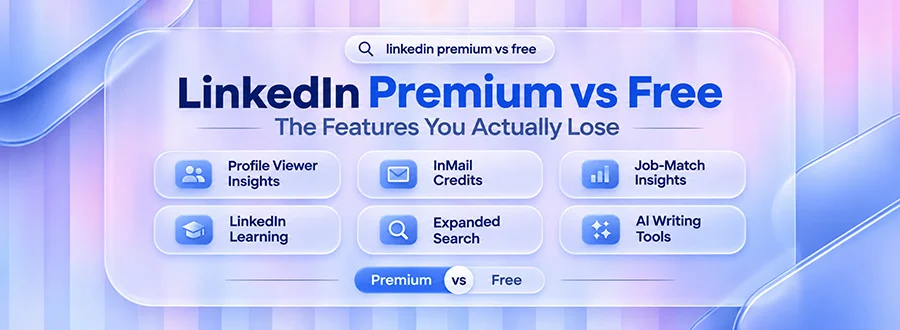
LinkedIn Premium vs Free: The Features You Actually Lose
The practical differences become clearer when you look at individual workflows rather than comparing badges. Here are the capabilities most likely to affect your time, decisions, and outreach strategy.
1. Deeper Visibility Into Who Viewed Your Profile
Free members receive limited viewer information, while eligible Premium users can access a fuller history and additional insights, subject to account settings and LinkedIn’s current rules. This can reveal patterns in attention to your profile, such as whether recruiters or people in a target industry are checking your experience.
However, Premium cannot identify someone who deliberately browses in private mode. Nor does every profile view indicate a job offer or genuine sales opportunity. The feature is useful when you plan to act on relevant signals, not when you simply want to satisfy curiosity.
2. InMail Credits for Reaching Beyond Your Network
One of the strongest differences in linkedin free vs premium features is InMail. Basic members can message established connections and may receive messages from eligible senders, but they do not receive the paid credits for initiating InMail conversations with unrelated members. Premium Career currently advertises five monthly InMail credits; other plans offer different allowances.
This can help when a relevant recruiter, hiring manager, or potential collaborator is difficult to reach through normal networking. Yet an InMail is not a guaranteed reply. An irrelevant, generic pitch can be ignored just as easily as an ordinary email.
3. Job-Matching Insights and Applicant Guidance
Premium Career provides additional job-search tools, including insights designed to help members understand fit, identify stronger opportunities, and improve applications. Some features highlight positions where a member may be a stronger applicant or allow a role to be marked as a top choice.
These signals can help prioritize a long list of vacancies, particularly when you are applying across different industries or comparing roles with overlapping requirements. AI-assisted suggestions can also help you reconsider wording and identify gaps in your presentation.
4. LinkedIn Learning Access
Many Premium subscriptions include access to LinkedIn Learning, which offers a large catalog of professional courses. Topics range from spreadsheets and project management to communication, leadership, programming, and design. This can be especially useful when your learning goals align with a career transition.
But access is only valuable if you complete relevant lessons and apply them. Watching a short course without producing a project, improving a process, or practicing a skill rarely changes your career trajectory. Free tutorials, employer training, public libraries, and other educational resources may already meet your needs.
5. Expanded Search and Business Research Tools
Search capabilities are a frequent source of confusion in the linkedin premium vs free debate. Free accounts can search members and use standard filters. Premium Business and certain specialized products offer broader people-search capabilities or additional filters. However, Premium Career does not automatically remove LinkedIn’s commercial-use search limits.
This distinction matters to recruiters, sales professionals, and founders who repeatedly research people outside their existing network. A casual job seeker may never notice the limitation, while someone building prospect lists may encounter it quickly.
A paid account also does not authorize scraping, unrestricted automation, or bypassing platform rules. Even when a tier provides greater access, responsible use and applicable limits still matter. Review the exact product rather than assuming every Premium label means unlimited prospecting.
6. Company Insights and Professional Research
Premium Business can provide additional information about organizations, such as business and hiring trends. Used carefully, these details can help you prepare for conversations or identify companies whose direction matches your services.
Still, company insights are starting points for research, not proof of financial health or buying intent. Verify important conclusions through official company announcements, job advertisements, and direct conversations before making decisions.
7. AI-Assisted Writing and Profile Suggestions
Selected Premium tiers provide AI-powered support for profile improvements, job applications, or message writing. These tools can reduce the friction of drafting a strong summary or preparing a clear outreach note, especially if writing does not come naturally to you.
The downside is that automated text can sound polished but generic. Recruiters and potential clients are more likely to respond to specific accomplishments, relevant context, and genuine interest than to repeated corporate buzzwords. Premium writing assistance should be treated as an editor, not a substitute for your own voice.
LinkedIn Free vs Premium Features: A Practical Comparison
| Everyday task | Basic account | Relevant Premium benefit |
| Build a professional profile | Yes | Additional suggestions on eligible plans |
| Apply for posted jobs | Yes | Extra job-fit and applicant guidance |
| Message existing connections | Yes | Still available |
| Contact people outside your network | Connection requests and other permitted paths | InMail credits according to plan |
| Check profile viewers | Limited history and details | Broader history and insights, subject to privacy |
| Learn professional skills | Free and external resources | LinkedIn Learning on qualifying plans |
| Research people and companies | Basic search and filters | Expanded options on certain tiers |
| Publish content and engage | Yes | No subscription required for ordinary posts |
For readers comparing linkedin free vs premium features, the table is a useful shortcut, but it cannot capture every regional variation or product-specific restriction. In the linkedin free vs premium features comparison, exact entitlements matter more than broad labels. Look at the features you would use this month, not every possible feature in a subscription brochure.
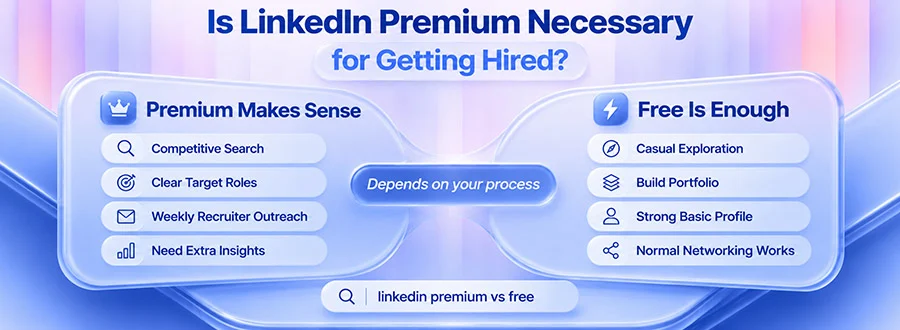
Is LinkedIn Premium Necessary for Getting Hired?
A common question is linkedin premium vs free for a serious job search. The answer depends on your circumstances, but the fundamentals of hiring remain unchanged. Employers evaluate role relevance, work experience, demonstrated skills, communication, and interview performance. Subscription status is not a replacement for any of those factors.
If you are starting your career, a high-quality free profile can be enough to make meaningful progress. Write a headline that identifies your target role, explain what you can do, and showcase internships, projects, volunteer work, or measurable academic accomplishments. Follow employers and build a network before you urgently need it.
Experienced professionals may benefit more from Premium when facing a narrow, competitive search. Additional insights could help them find suitable opportunities, and InMail may offer a direct route to decision-makers. However, the advantage is more likely to come from a disciplined search process than from the membership alone.
When Premium Career Could Make Sense
Consider paying during a focused application period if you already have a polished résumé, clear target roles, and a weekly outreach plan. The extra tools become valuable when they help you prioritize applications, identify relevant contacts, and improve messages you were going to send anyway.
Ask yourself: is linkedin premium necessary if you apply to only two jobs a month? Probably not. But if you are actively changing industries, tracking many roles, and speaking to recruiters each week, testing the added functionality may be reasonable.
When Free Is Probably Enough
Stick with Basic when you are exploring options casually, receiving satisfactory responses through normal networking, or still working on your portfolio and résumé. Those foundational improvements are available regardless of subscription.
Be careful not to mistake payment for productivity. A person who sends five thoughtful connection requests may gain more than someone who pays for Premium but never starts meaningful conversations.
Is LinkedIn Premium Necessary for Freelancers and Business Owners?
Freelancers comparing linkedin premium vs free often ask is linkedin premium necessary to attract clients. The answer is usually no, but the right subscription can support a targeted business-development process. Start by showing evidence of your work. Describe the problem you solve, display relevant case studies, and publish observations that potential clients can recognize from their own situation.
A free account can support inbound visibility through useful posts and genuine participation in professional discussions. It can also help you reconnect with previous clients and ask satisfied partners for introductions. These activities build trust without recurring software costs.
Premium Business may become helpful when you regularly research target companies, identify contacts, and track potential buying signals. For high-volume prospecting, evaluate specialist solutions separately instead of assuming Premium Career covers your needs.
What Happens When You Cancel Premium?
Cancellation generally means retaining paid benefits until the end of the current billing cycle, followed by a return to the free experience. LinkedIn indicates that Premium features, including unused InMail credits, expire when the paid access ends. Check your billing screen for the exact date and any applicable terms.
Your profile, connections, published posts, and ordinary networking activity do not disappear simply because you stop subscribing. You can continue applying for jobs and messaging connections. What you lose is the paid layer of insights, credits, learning access, and other features associated with your plan.
The practical linkedin premium vs free decision can also change over time. Subscribing for a busy transition and cancelling when it ends may be smarter than paying continuously without a defined purpose.
How to Decide Whether the Cost Is Worth It
Rather than asking whether a paid account looks more professional, calculate the value of tasks it genuinely improves. Start with your subscription’s actual local price, not a generic figure from an advertisement. Prices, taxes, trials, and plan options can vary by location and billing method.
Then estimate how often you would use its exclusive tools. Would expanded insights save research time? Would InMail help reach decision-makers you cannot reasonably contact otherwise? Would completing relevant courses replace training you were planning to purchase elsewhere?
A Simple Return-on-Value Test
Set a Measurable Thirty-Day Goal
Write down your main goal for the next thirty days. Perhaps you want ten recruiter conversations, five qualified sales meetings, or completion of a skills course. List the Premium functions that directly support that goal, and track whether you actually use them.
If a monthly subscription costs more than the value it creates, downgrade. If it consistently saves time or helps generate opportunities that justify the price, continue. This is a more dependable way to answer is linkedin premium necessary than relying on testimonials from people with completely different objectives.
Common Misconceptions That Lead to Unnecessary Upgrades
One misconception in discussions of linkedin free vs premium features is that recruiters only take Premium users seriously. Employers generally care about fit and credibility, not whether an applicant pays for platform extras. A complete, convincing profile remains crucial on either plan.
Another assumption is that Premium guarantees better search ranking or viral posts. LinkedIn does not promise that buying a subscription will make every post reach more people. Content relevance, audience interest, relationships, and engagement still deserve attention.
Finally, people sometimes believe Premium unlocks unlimited messages and unrestricted searching. Credits and limits depend on the product. Understanding linkedin free vs premium features prevents disappointment after purchase and helps you choose the right tier for the work you actually do.
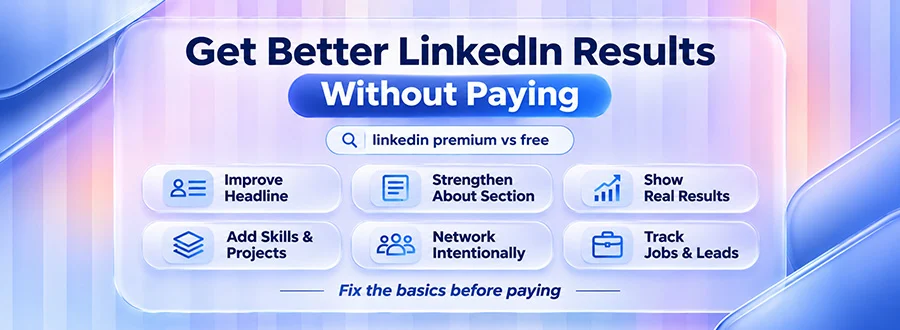
How to Get Better Results Without Paying
Free users examining linkedin premium vs free can improve outcomes by being more intentional. Begin with a headline that explains your expertise and target audience instead of listing vague qualities. In your About section, explain the problems you solve, the evidence behind your capabilities, and the opportunities you welcome.
Use the experience section to show results, not just job descriptions. Replace statements such as “responsible for marketing” with examples that explain what you changed and why it mattered. Add relevant skills, project links, and recommendations when appropriate.
Invest in relationships as well. Comment thoughtfully on posts from people in your field, reconnect with former colleagues, and personalize connection invitations. Avoid sending identical sales pitches to everyone who accepts. Relevance makes networking feel like a conversation rather than a campaign.
For job hunting, maintain a simple spreadsheet of employers, positions, application dates, contacts, and follow-ups. For business development, define your ideal client and document what you learn from each conversation. These habits are not exclusive to any subscription, yet they often determine results.
If you still wonder is linkedin premium necessary, try improving these basics for several weeks before spending money. You may discover that the obstacle was not missing software but missing clarity, consistency, or follow-through.
When to Try Premium and When to Skip It
Understanding linkedin free vs premium features makes a trial useful if you are eligible and have a specific project ready. Do not activate one simply because LinkedIn displays an attractive offer. Plan the work first: update your profile, select target jobs or companies, and block time to test the features you believe will help.
Check renewal dates and cancellation rules before starting. A free trial can become a paid subscription if you do not cancel under the stated terms. Keeping a reminder in your calendar protects you from spending on a tool you may no longer need.
The best timing is usually a period of concentrated activity: an active job hunt, a structured networking campaign, or a defined learning sprint. Outside those periods, Basic often offers the strongest value because it accomplishes the essentials at no subscription cost.
Frequently Asked Questions
Is LinkedIn Free Enough for Most Professionals?
Yes, for people primarily maintaining a profile, connecting with colleagues, sharing updates, and applying for occasional jobs. Premium is more attractive when specific advanced tools support frequent, measurable activities.
Can I Message Recruiters Without Premium?
You can message recruiters who are your connections and use other permitted contact methods, including suitable connection requests. InMail credits provide an additional way to reach people outside your network, but an ordinary connection is often sufficient.
Does Premium Show Every Person Who Viewed My Profile?
No. More extensive viewer history does not override another member’s privacy choices. Members who browse privately cannot be identified through a Premium subscription.
Is LinkedIn Premium Necessary for Students?
For most students, a strong free profile, relevant projects, internship applications, and genuine networking should come first. A short Premium trial might help with targeted learning or an intensive graduate job search, but it is not a graduation requirement.
Will My Connections Disappear If I Downgrade?
No. Your existing network and ordinary profile content remain. The changes concern paid functionality, such as InMail entitlements and enhanced insights, after the billing period ends.
Which Premium Plan Should I Choose?
Choose by purpose rather than the word Premium. Career is oriented toward job seekers and learning. Business supports broader networking and company research. Dedicated sales or recruiting tools fit more specialized workflows. Verify current plan details before purchasing.
Final Verdict: Pay for a Workflow, Not a Badge
The central lesson of linkedin premium vs free is simple: most professional activity does not require payment, while certain focused tasks become easier with the right paid features. What you actually lose on Basic is expanded insight and convenience, not your ability to build relationships, develop credibility, or find work.
A subscription is worthwhile when you know which capabilities you need, use them regularly, and can observe a genuine benefit. Otherwise, the free membership is not a compromised version of your career. It is a capable platform that rewards a clear profile, relevant expertise, and consistent interaction.
Start with the free tools, identify your bottleneck, and upgrade only when a specific Premium feature addresses it. That approach keeps the decision practical, flexible, and aligned with your goals.