
Verify LinkedIn with Your Work Email (Step by Step)
linkedin verification with work email is a practical way for eligible professionals to confirm their workplace association without uploading a passport or government-issued identity document. If you’ve noticed a verification option on your LinkedIn profile, you may be wondering whether your company email address is enough to complete the process.
For many employees, their work email is already part of their professional identity. They use it to communicate with colleagues, attend meetings, and access company systems. LinkedIn’s workplace verification feature builds on that connection by allowing eligible members to confirm their association with an organization.
However, not every email address qualifies, and the process isn’t available to every company or LinkedIn account.
You might encounter an unsupported email domain, a missing verification option, or a confirmation message that never arrives.
This guide explains how workplace verification works, who qualifies, how to complete the steps, and what to do when something goes wrong. You’ll also learn how it differs from identity verification, what information may be displayed, and how to protect your account throughout the process.
What Is LinkedIn Verification with Work Email?
linkedin verification with work email is a feature that allows eligible LinkedIn members to verify their association with an organization using an approved company email address.
Instead of submitting identification documents, members confirm that they can access an email account associated with an eligible employer.
When the process succeeds, LinkedIn may display workplace verification information on the member’s profile.
The purpose is to provide additional confidence about a professional’s organizational association.
How Workplace Email Verification Works
The process typically begins within LinkedIn.
An eligible member selects the workplace verification option, enters an approved company email address, and receives a confirmation message.
The member then follows the instructions in that message.
LinkedIn evaluates whether the verification requirements have been satisfied.
If successful, the member’s profile may display relevant workplace verification information.
What Does Workplace Verification Actually Confirm?
Workplace verification generally confirms an eligible association with an organization through a supported method.
It doesn’t independently validate every statement in your employment history.
For example, verification doesn’t necessarily confirm your exact job responsibilities, salary, qualifications, or professional performance.
It also doesn’t guarantee that your employer endorses everything you publish.
Is Workplace Verification Different from Identity Verification?
Yes.
Identity verification focuses on confirming information about the person operating an account.
Workplace verification focuses on confirming an eligible organizational association.
Some identity verification methods require government-issued identification, while workplace email verification may not.
Both can provide useful context, but they establish different attributes.
Why Verify LinkedIn Using Your Company Email?
For professionals who regularly network online, linkedin verification via work email can provide an additional signal of workplace authenticity.
LinkedIn profiles often serve as introductions between people who have never met.
Recruiters, prospective clients, and industry contacts may review employment information before deciding whether to connect.
Workplace verification can complement that information.
Builds Confidence in Professional Associations
Imagine receiving a message from someone claiming to represent a company you’ve never worked with.
Their profile includes the company’s name, job title, and professional experience.
If the profile also displays relevant workplace verification information, that may provide additional reassurance about the claimed association.
However, you should still evaluate the person’s message and business claims independently.
Supports Professional Networking
Verified workplace information may be useful when connecting with professionals outside your immediate network.
It can provide another piece of context alongside your experience, recommendations, and mutual connections.
Nevertheless, verification alone doesn’t guarantee connection acceptance or meaningful professional relationships.
Helps Present a Consistent Professional Identity
An accurate LinkedIn profile should reflect your genuine employment history and current professional activities.
Workplace verification can complement this information when you’re eligible.
It may be particularly relevant for employees who communicate frequently with external partners, clients, or recruiters.
Does Verification Increase Profile Visibility?
LinkedIn doesn’t guarantee that workplace verification automatically improves search rankings, profile views, or engagement.
A verification indicator should be understood as a trust-related feature rather than a guaranteed visibility tool.
Your experience, profile relevance, professional relationships, and content still matter.
Requirements for LinkedIn Verification via Work Email
Before attempting linkedin verification via work email, check whether your account and organization support the feature.
Not every LinkedIn member can verify through a company email address.
Eligibility depends on LinkedIn’s supported methods, organizational requirements, and the email domain involved.
An Eligible Company Email Address
You’ll generally need an email address associated with a supported organization.
The address must satisfy LinkedIn’s applicable workplace verification requirements.
Simply having an email address with a business-looking domain doesn’t guarantee eligibility.
Some organizations may not participate or may not have access to the method.
Access to Your Company Inbox
You must be able to receive the verification message and complete the requested confirmation.
If your work email account is inactive or you cannot access its inbox, you may be unable to finish the process.
Use an address you are authorized to access.
Accurate Employment Information
Your LinkedIn profile should contain accurate details about your professional association.
If your current employer is missing or incorrect, review your Experience section before attempting verification.
Don’t invent an employment relationship simply to qualify.
A Supported LinkedIn Account
Workplace verification availability can depend on your account and the organization’s eligibility.
The option may not appear even when you have a legitimate work email address.
This doesn’t automatically mean your account is restricted or suspicious.
Do You Need LinkedIn Premium?
No. LinkedIn’s standard profile verification features are free for eligible members.
You don’t generally need a Premium subscription to use an available workplace verification method.
Avoid third-party services promising guaranteed verification in exchange for payment.
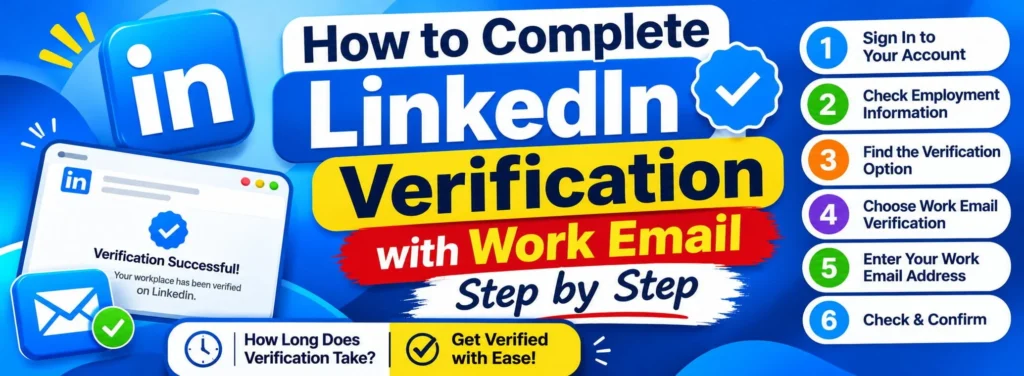
How to Complete LinkedIn Verification with Work Email: Step by Step
The following walkthrough explains the typical linkedin verification with work email process.
LinkedIn may update its interface, and available options can differ between accounts. Follow the instructions displayed in your own profile if they differ from these steps.
Step 1: Sign In to Your LinkedIn Account
Open LinkedIn through its official website or mobile application.
Sign in using your existing account credentials.
Make sure you’re accessing the profile associated with your genuine professional identity.
If LinkedIn requests an additional security check, complete it before continuing.
Step 2: Review Your Current Employment Information
Navigate to your profile and review the Experience section.
Check that your current employer is listed accurately.
Make sure you’ve selected the correct organization where applicable.
If the information needs correction, update it honestly before starting verification.
An accurate employment entry helps maintain consistency across your profile.
Step 3: Find the Verification Option
Look for an available verification section on your LinkedIn profile.
Depending on the interface, you may see an option such as “Verify now” or another verification-related prompt.
Open the available verification methods.
If workplace email verification doesn’t appear, your account or organization may not currently qualify.
Step 4: Choose Workplace Email Verification
If the method is available, select the option to verify your workplace using an eligible company email.
Read the instructions carefully.
The interface should explain what information you need to provide.
Some organizations may support other workplace verification methods instead.
Step 5: Enter Your Eligible Work Email Address
Provide the company email address associated with your qualifying workplace.
Check the spelling and domain before submitting.
For example, an eligible employee might use an address following the format employee@company.com.
This is only an illustrative format, not a guarantee that the domain qualifies.
Step 6: Check Your Company Inbox
LinkedIn may send a confirmation message to the email address you provided.
Open your work inbox and look for the message.
If it doesn’t arrive, check your spam or junk folder.
Allow time for normal email delivery before requesting another message.
Step 7: Complete the Confirmation
Follow the instructions contained in the legitimate verification message.
This may involve opening a confirmation link or completing another authorized step.
Only use the official verification process.
Never share your LinkedIn password or authentication codes with someone claiming to complete verification on your behalf.
Step 8: Review Your Verification Status
Return to your LinkedIn profile after completing the confirmation.
Check whether workplace verification information has appeared.
If the process remains incomplete, review any messages or instructions displayed.
A successful email confirmation doesn’t necessarily mean every possible profile attribute has been independently verified.
How Long Does Verification Take?
The submission steps may be completed quickly when your email arrives promptly and the confirmation works.
However, there is no universal guaranteed completion time.
Email delivery problems, organizational eligibility, and technical issues can delay the process.
What Email Address Can You Use for LinkedIn Verification?
Choosing the right work email for linkedin verification is important because LinkedIn doesn’t automatically accept every address.
The relevant factor is whether the address and organization meet the requirements of the available workplace verification method.
Corporate Email Addresses
An email account issued by an eligible employer may qualify.
For example, a company might provide employees with addresses under its official domain.
However, LinkedIn must support the relevant organizational verification arrangement.
Gmail, Outlook, and Other Personal Email Addresses
Personal email accounts generally aren’t suitable substitutes for an eligible organizational email address.
Even if you use a personal Gmail or Outlook account for business communication, that doesn’t automatically establish an eligible workplace association.
Follow the specific domain requirements shown by LinkedIn.
Custom Business Domains
A custom domain can look professional, but owning a domain doesn’t automatically qualify you for workplace verification.
Eligibility depends on LinkedIn’s supported process and organizational requirements.
Freelancers and small-business owners shouldn’t assume that creating a custom email address will make verification available.
Shared or Departmental Email Addresses
Shared inboxes such as info@company.com or support@company.com may not satisfy requirements intended for an individual employee.
Use an authorized individual account when required.
Don’t use a colleague’s address or a shared inbox to misrepresent your employment association.
LinkedIn Verification via Work Email Not Working? Common Problems
If linkedin verification via work email isn’t working, identify the exact stage where the process stops.
A missing option, rejected email address, and undelivered confirmation message are different problems.
Each requires a different solution.
Problem 1: The Verification Option Is Missing
Your LinkedIn account may not currently offer workplace email verification.
This can happen because your organization, domain, or account isn’t eligible for that method.
Review the available verification options and consult LinkedIn’s current Help Center guidance.
Don’t assume that repeatedly refreshing your profile will enable an unsupported feature.
Problem 2: Your Company Email Is Rejected
A rejected address may indicate that the domain doesn’t meet the eligibility requirements.
First, confirm that you’ve entered the address correctly.
Check whether your organization supports workplace verification.
If the domain isn’t eligible, using another employee’s address won’t solve the underlying problem.
Problem 3: The Verification Email Never Arrives
Check your inbox, spam folder, and any organizational quarantine system.
Make sure the address was entered correctly.
Some companies apply strict filtering rules to external messages.
If necessary, ask your IT team whether the message was blocked.
Problem 4: The Confirmation Link Has Expired
Verification links may be time-sensitive.
If you open an expired link, the confirmation may fail.
Request a new message through LinkedIn when that option is available.
Avoid relying on old verification emails.
Problem 5: The Verification Page Won’t Load
Browser compatibility, unstable connectivity, or temporary technical issues may interrupt the process.
Try an updated browser and a reliable network.
If the problem continues, record the exact error message before contacting support.
Problem 6: Verification Completes but Doesn’t Appear
Sometimes the confirmation process appears successful, but the expected information isn’t immediately visible.
Check your verification status and any notifications.
If LinkedIn indicates that additional processing is required, follow those instructions.
If the issue remains unresolved, use official support.
Can You Use a Work Email for LinkedIn Verification as a Freelancer?
Freelancers often ask whether they can use a work email for linkedin verification when they operate independently rather than working for a large company.
The answer depends on the eligibility requirements of LinkedIn’s supported verification methods.
Having a business email address is not automatically enough.
Self-Employed Professionals
A self-employed consultant might own a website and use a professional email address associated with that domain.
Although the address represents a genuine business, LinkedIn may not recognize it as eligible for workplace email verification.
The verification method must be supported for the organization and account.
Agency Owners and Small Businesses
Small-business owners may face similar limitations.
Creating an email address under a company domain doesn’t automatically make that organization eligible.
If the option is unavailable, review whether another supported verification method exists.
Alternative Verification Options
If workplace verification isn’t available, eligible members may be offered identity verification through an approved provider.
Some identity verification methods require government-issued identification.
Others have different technical requirements.
Check the methods available through your LinkedIn account rather than purchasing unnecessary services.
Is LinkedIn Verification with Work Email Safe?
Privacy is an important consideration when completing linkedin verification with work email, even though this method may require less sensitive information than government-ID verification.
You should understand what you’re confirming and how the information may be used.
What Information Does LinkedIn Verify?
Workplace email verification generally involves confirming access to an eligible organizational email address.
The process can establish a supported workplace association.
However, the exact information processed depends on LinkedIn’s current verification method and privacy terms.
Will Your Company See Your LinkedIn Activity?
Workplace verification shouldn’t be confused with giving your employer control over your personal LinkedIn account.
However, company email systems may be managed or monitored according to organizational policies.
Your employer’s IT administrators may have access to certain email-system records.
Review your company’s policies if you’re concerned about workplace email privacy.
Does LinkedIn Display Your Email Address Publicly?
Workplace verification doesn’t inherently require displaying your complete work email address publicly.
Nevertheless, profile visibility and contact-information settings are separate matters.
Review your LinkedIn privacy settings and the information displayed after verification.
How to Protect Your Account
Use a strong, unique password and enable two-step verification.
Begin verification through LinkedIn’s official interface.
Avoid unexpected messages asking for passwords, authentication codes, or sensitive information.
Never allow someone else to access your account to complete verification.
Work Email for LinkedIn Verification: Mistakes to Avoid
Choosing a work email for linkedin verification involves more than entering an address that looks professional.
A few common mistakes can create unnecessary delays or cause the process to fail.
Using an Email Address You Cannot Access
Some professionals list an old employer on their profiles but no longer have access to that organization’s email system.
You should not attempt to verify a current workplace association using an account you are no longer authorized to access.
Keep your employment history accurate.
Entering the Wrong Email Domain
A simple typing mistake can prevent the verification message from reaching you.
Double-check the address before submitting.
If your employer operates several domains, use the one supported by the verification process.
Assuming Every Company Is Eligible
Not all employers participate in workplace verification.
A genuine company email address may still be unsupported.
Check availability before attempting repeated submissions.
Buying Verification Services
Avoid individuals or websites promising to verify your LinkedIn profile for a fee.
Standard LinkedIn profile verification is free for eligible members.
An unofficial service cannot legitimately guarantee approval.
LinkedIn Verification via Work Email vs. Government ID
Professionals comparing linkedin verification via work email with government-ID verification should understand that these methods serve different purposes.
One confirms an eligible workplace association. The other focuses on identity.
Neither method automatically proves every statement on a LinkedIn profile.
| Feature | Workplace email verification | Government-ID identity verification |
| Main purpose | Confirm eligible workplace association | Confirm identity |
| Typical requirement | Supported organizational email | Eligible identification and required checks |
| Passport required | Generally no | Depends on provider |
| Employer participation | May be required | Not necessarily |
| Availability | Depends on organization and account | Depends on location, provider, and account |
| Standard verification fee | Free for eligible members | Free for eligible members |
Which Method Should You Choose?
Choose a method based on the attribute you want verified and the options available to your account.
If you need workplace confirmation and your organization is eligible, email verification may be convenient.
If you want identity verification, an approved identity provider may be more appropriate.
Can You Complete Both?
Some members may qualify for multiple verification methods.
Where LinkedIn supports them, completing different verification types may provide confirmation of different attributes.
However, eligibility for one method doesn’t guarantee eligibility for another.
Does LinkedIn Verification Help Recruiters and Job Seekers?
Job seekers may consider linkedin verification with work email because they want their professional profiles to appear credible to recruiters.
A verified workplace association can provide additional context, particularly when the member currently works for an eligible organization.
However, recruiters still need to evaluate qualifications, achievements, and suitability.
Benefits for Job Seekers
Workplace verification may complement an accurate employment history.
It can provide an additional signal about a current professional association.
Nevertheless, candidates should prioritize clear descriptions of their experience, relevant skills, and measurable achievements.
Benefits for Recruiters
Recruiters who have verified workplace information may provide additional context to candidates receiving unfamiliar messages.
However, candidates should still independently evaluate job offers.
A verified workplace association doesn’t guarantee that every opportunity is legitimate.
Benefits for B2B Professionals
Sales representatives and account managers frequently communicate with people outside their organizations.
Workplace verification may support initial confidence about organizational affiliation.
Still, effective outreach depends on relevance, professionalism, and clear communication.
Verification isn’t a substitute for responsible business practices.
Frequently Asked Questions About LinkedIn Work Email Verification
Can I Complete LinkedIn Verification with Work Email for Free?
Yes. linkedin verification with work email is free for eligible members.
You don’t generally need LinkedIn Premium or a paid third-party service.
However, your account and organization must support the method.
Does LinkedIn Verification via Work Email Require a Passport?
No. linkedin verification via work email generally confirms an eligible workplace association without requiring a passport.
However, it doesn’t replace every type of identity verification.
If LinkedIn separately requests identity confirmation for account recovery, different requirements may apply.
Can I Use a Personal Email Instead of a Work Email for LinkedIn Verification?
A personal email address generally cannot substitute for an eligible organizational address.
The work email for linkedin verification must satisfy the requirements displayed in your account.
Having access to a personal inbox doesn’t establish an eligible workplace association.
Why Is My LinkedIn Verification with Work Email Not Available?
linkedin verification with work email may be unavailable because your employer, email domain, or account doesn’t qualify.
Check the available verification methods and LinkedIn’s current guidance.
An unavailable option doesn’t automatically mean your account has a security problem.
How Long Does LinkedIn Verification via Work Email Take?
linkedin verification via work email may be completed quickly when the confirmation message arrives and the required steps succeed.
However, email delivery, eligibility checks, and technical issues can cause delays.
There is no guaranteed universal completion time.
Can I Use My Previous Employer’s Email Address?
You shouldn’t use an old employer’s email account to misrepresent a current workplace association.
Use only an address you’re authorized to access and that satisfies the relevant requirements.
Keep your LinkedIn employment information accurate.
What If My Work Email for LinkedIn Verification Is Rejected?
If your work email for linkedin verification is rejected, confirm that the address is correct and the domain is eligible.
If your employer doesn’t support the method, check for other available verification options.
Repeated submissions of an unsupported address are unlikely to help.
Is LinkedIn Verification with Work Email Better Than Identity Verification?
linkedin verification with work email and identity verification confirm different attributes.
Workplace verification can establish an eligible organizational association, while identity verification focuses on confirming the individual.
Neither is universally better.
Choose the method that matches your needs and eligibility.
Final Thoughts: Verify Your Workplace the Right Way
Completing linkedin verification with work email can be a convenient way to confirm an eligible workplace association without submitting government-issued identification.
The process generally involves selecting workplace verification, entering a supported company email address, receiving a confirmation message, and completing the required steps.
However, linkedin verification via work email isn’t available to every professional or organization.
If the option is missing or your email is rejected, review your eligibility rather than relying on unofficial verification services.
Before submitting a work email for linkedin verification, make sure the address belongs to an eligible organization and that you’re authorized to access it.
A verified workplace association can complement your professional credibility, but it doesn’t replace accurate experience, meaningful networking, or trustworthy communication.
For eligible professionals, linkedin verification with work email is worth considering as an additional way to strengthen confidence in their LinkedIn profiles.


