
How to Get the LinkedIn Verified Badge in 5 Minutes
The linkedin verification badge is becoming an important trust signal for professionals who want to establish a credible presence on LinkedIn. Whether you’re a job seeker, freelancer, business owner, recruiter, or industry expert, having a verified profile can help others feel more confident about your professional identity.
But getting verified isn’t always as straightforward as it sounds.
You might have noticed verification indicators on other LinkedIn profiles and wondered how those members completed the process. Perhaps you’ve already searched for verification settings but couldn’t find the right option.
The good news is that eligible members can often complete the required steps in just a few minutes. However, actual approval time depends on the verification method, provider, and whether additional checks are needed.
In this guide, you’ll learn how LinkedIn verification works, which documents you may need, how to verify your identity or workplace, and what to do if the process fails.
We’ll also explain common misconceptions about verification, including whether LinkedIn offers a traditional blue checkmark and whether you need to pay for verification.
What Is the LinkedIn Verification Badge?
The linkedin verification badge is a visual indicator associated with LinkedIn’s profile verification features. It helps other members understand that certain information about a professional has been confirmed through an available verification method.
LinkedIn offers verification options designed to establish confidence in a member’s identity, workplace association, or other eligible professional information.
Unlike traditional social media verification systems that often focus on celebrities or public figures, LinkedIn’s approach is intended to make verification accessible to a broader professional audience.
You don’t necessarily need thousands of followers, a famous employer, or a large personal brand to qualify.
Instead, eligibility depends on the verification methods available to your account and whether you meet their requirements.
What Does a Verified LinkedIn Profile Mean?
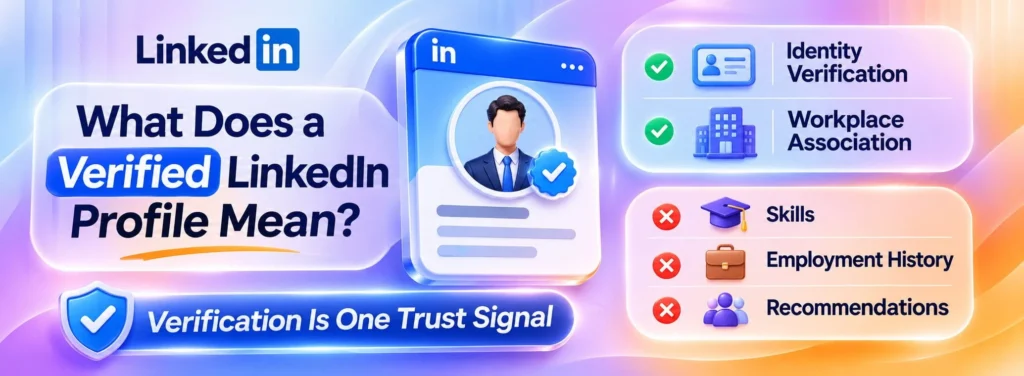
A verified profile indicates that LinkedIn has received confirmation through a supported verification process.
For example, identity verification may involve confirming your identity using an approved provider and eligible identification.
Workplace verification may involve confirming your association with an organization through an approved email domain or an employer-supported system.
However, verification doesn’t mean LinkedIn has independently confirmed every statement in your profile.
Your employment history, professional abilities, recommendations, and published content should still be evaluated on their own merits.
Is LinkedIn Verification the Same as a Blue Tick?
Many people search for the linkedin verification blue tick because they’re familiar with verification symbols on other social media platforms.
However, LinkedIn’s verification design and terminology are different from the traditional blue-checkmark systems associated with some other networks.
LinkedIn displays verification information through its own profile interface, and the exact appearance may change as the platform updates its features.
The important thing is the verification status and what has been confirmed, rather than the color of a symbol.
Why Should You Get Verified on LinkedIn?
Before exploring how to get linkedin verification badge access, it’s worth understanding why verification can be useful.
LinkedIn connects professionals who may never have met in person. Recruiters evaluate candidates, businesses research potential partners, and freelancers communicate with prospective clients.
In these situations, identity confidence matters.
Verification can provide an additional signal that helps people assess the authenticity of a profile.
Build Confidence With New Connections
Imagine receiving connection requests from two unfamiliar professionals.
Both profiles appear relevant, but one displays verified identity information.
That verification may provide additional reassurance about the person’s identity.
It doesn’t guarantee that the individual is trustworthy, but it gives you another piece of information when deciding whether to connect.
Support Your Professional Reputation
A complete, accurate profile already contributes to credibility.
Verification can complement that information by confirming eligible identity or workplace details.
For consultants, freelancers, and independent professionals, this additional confirmation may be useful when introducing themselves to new audiences.
Make Your Profile More Transparent
LinkedIn users often encounter profiles with limited information, unclear employment histories, or unfamiliar names.
Verification can help distinguish an account that has completed a supported check from one that hasn’t.
However, an unverified profile isn’t automatically fake or suspicious.
Many legitimate members simply don’t have access to an eligible verification method.
Does Verification Improve LinkedIn Rankings?
There is no reliable basis for promising that verification automatically improves LinkedIn search rankings, increases profile views, or generates more leads.
LinkedIn doesn’t guarantee these outcomes simply because someone completes verification.
A verified profile may influence how individual visitors perceive your account, but visibility and engagement depend on many factors.
Focus on verification as an authenticity feature rather than a shortcut to higher rankings.
How to Get LinkedIn Verification Badge in 5 Minutes: Step-by-Step Guide
If you’re wondering how to get linkedin verification badge status quickly, the process begins with checking which options LinkedIn makes available to your account.
For eligible members with the required documents and a compatible device, the submission process may take approximately five minutes.
That timeframe is an estimate, not a guaranteed completion or approval time.
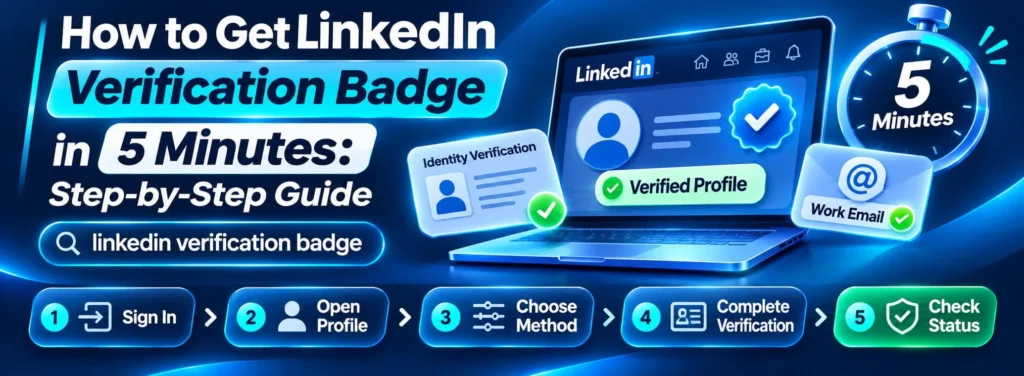
Step 1: Sign In to Your LinkedIn Account
Open the official LinkedIn website or mobile application.
Sign in using your existing account credentials.
Make sure you’re accessing your own profile and that your contact information is current.
If LinkedIn requires additional account-security checks, complete those before proceeding.
Avoid unofficial websites offering instant verification.
Step 2: Open Your LinkedIn Profile
Navigate to your profile by selecting your profile picture or the appropriate profile navigation option.
Look for a verification-related section or a button such as “Verify now,” if available.
The wording and placement can vary by device, account eligibility, and interface version.
If you can’t find the option, consult LinkedIn’s Help Center for the current navigation instructions.
Not every account has access to every verification method.
Step 3: Choose an Available Verification Method
LinkedIn may offer identity verification, workplace verification, or another supported option.
Choose the method that matches your circumstances.
For example, identity verification may require eligible government-issued identification and a compatible mobile device.
Workplace verification may require an approved work email address or an organization-supported verification system.
Read the instructions carefully before continuing.
Step 4: Complete the Required Verification
Follow the instructions displayed by LinkedIn or its authorized verification provider.
For identity verification, you may need to capture your identification document and complete additional identity-confirmation steps.
For workplace verification, you may need to confirm access to an eligible company email account.
Don’t upload edited identification images or submit information belonging to another person.
Complete the process using accurate details.
Step 5: Check Your Verification Status
After submitting the required information, return to your profile and review the status.
Some verification methods may provide a quick result, while others require additional processing.
If your verification is approved, LinkedIn should display the relevant verification information through its supported interface.
If the process remains pending, follow any instructions provided.
Avoid repeatedly submitting identical requests without understanding whether further action is needed.
Can You Really Get Verified in Five Minutes?
You may be able to finish the required steps within five minutes if your account is eligible and everything works smoothly.
However, no universal five-minute approval guarantee exists.
Document compatibility, technical problems, verification-provider processing, and additional reviews can extend the timeline.
The most useful approach is to prepare your information before starting.
Method 1: Verify Your Identity With an Approved Provider
Identity verification is one of the main ways eligible professionals can obtain the linkedin verification badge.
This method is intended to confirm that the person operating the account matches the identity information submitted through the verification process.
LinkedIn works with approved verification providers, and available options depend on factors such as country, document eligibility, and account access.
What Documents Do You Need?
The required documents depend on the verification provider and the country in which you’re completing the process.
Some methods may require a supported passport or other eligible government-issued identification.
Certain verification experiences may also require a document with specific electronic security capabilities.
Before beginning, check the requirements displayed in your account.
Don’t assume that every national identity card, driving licence, or passport will be accepted.
How Does Identity Verification Work?
The verification process may involve capturing your identification document, confirming personal details, and completing a selfie or other identity check.
Some methods may use electronic document-reading technology.
These checks help the provider determine whether the submitted information meets its requirements.
After the process is completed, LinkedIn may display the appropriate verification information on your profile.
The exact steps depend on the provider.
How to Avoid Identity Verification Errors
If you’re researching how to get linkedin verification badge approval without unnecessary delays, preparation matters.
Use a valid, supported identification document.
Make sure your device has a functioning camera and that necessary permissions are enabled.
Choose a well-lit environment when capturing identification photographs.
Follow the instructions for document positioning and facial verification.
Avoid using screenshots, altered documents, or another person’s identification.
If your submission is rejected, review the explanation before attempting the process again.
Method 2: Get Verified Through Your Workplace
Workplace verification is another way eligible members can add professional confirmation to their profiles.
This method focuses on confirming an association with an organization rather than verifying every aspect of a person’s identity.
The available options depend on the employer and LinkedIn’s supported verification systems.
How Workplace Email Verification Works
Some eligible members can verify their workplace using a company-issued email address.
When the option is available, LinkedIn may send a verification message to an approved organizational email domain.
The member then follows the instructions to confirm access to that address.
However, simply having a work email doesn’t guarantee eligibility.
The organization and domain must satisfy the applicable requirements.
Verify Through an Employer-Supported System
Some organizations support workplace verification through approved identity or credential systems.
Employees may be able to confirm their association with the employer using that system.
The specific process depends on the organization’s configuration and LinkedIn’s supported integrations.
If you don’t see the option, ask your employer’s IT or identity-management team whether workplace verification is available.
What If You Work for Yourself?
Freelancers, consultants, and self-employed professionals may not have access to employer-based verification.
That doesn’t automatically prevent them from using other eligible methods.
If identity verification is available for your account, it may be a more suitable option.
The linkedin verification blue tick people often look for isn’t limited to employees of large companies.
What matters is whether you qualify for an officially supported verification method.
Method 3: Check Other Eligible Verification Options
LinkedIn’s verification ecosystem may include additional methods supported through participating organizations or authorized services.
Availability can change over time, so members should rely on current LinkedIn guidance rather than outdated tutorials.
Can You Verify Through a Professional Organization?
Some verification experiences may support eligible professional affiliations or organizational credentials.
However, this doesn’t mean every membership, certificate, or professional association qualifies.
Check whether LinkedIn explicitly offers a supported verification method for your circumstances.
Avoid uploading unrelated certificates in an attempt to obtain verification.
Which Method Should You Choose?
When deciding how to get linkedin verification badge access, select the method you can legitimately complete.
If you have eligible identification and identity verification is available, that may be the most straightforward option.
If your employer supports workplace verification, you may prefer to confirm your organizational association.
You may also be eligible for more than one verification type.
Each method confirms something different, so choose based on what you want your profile to communicate.
LinkedIn Verification Requirements You Should Know
Before applying for the linkedin verification badge, make sure you understand the eligibility requirements.
Verification isn’t necessarily available to every member, and completing the steps doesn’t guarantee approval.
Your account, location, identification, and chosen method may all affect eligibility.
Basic Eligibility Considerations
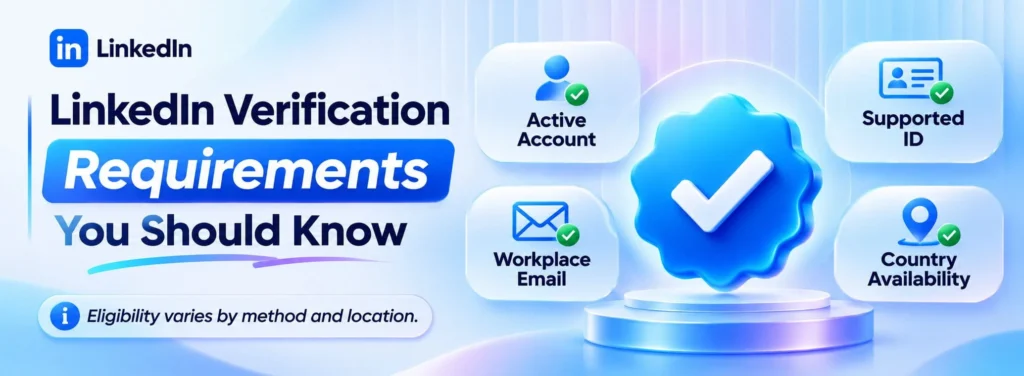
You generally need an active LinkedIn account and access to an available verification method.
Identity verification may require a supported document and compatible technology.
Workplace verification may require an eligible employer, approved email domain, or supported organizational system.
Additional requirements can apply depending on the provider.
Always follow the current instructions displayed during your verification attempt.
Do You Need a Minimum Number of Followers?
LinkedIn’s identity and workplace verification features aren’t generally based on achieving a particular follower count.
You don’t need to become an influencer before checking your eligibility.
A smaller professional network doesn’t automatically disqualify you.
However, other eligibility requirements may still apply.
Do You Need LinkedIn Premium?
The linkedin verification blue tick is sometimes confused with paid subscription benefits.
LinkedIn’s standard profile verification options aren’t generally dependent on purchasing LinkedIn Premium.
A Premium subscription and a verified profile serve different purposes.
Premium provides subscription features, while verification confirms eligible information through supported methods.
Don’t purchase a subscription solely because someone claims it’s required to obtain a verification indicator.
Is LinkedIn Verification Available Worldwide?
Verification availability differs by country and method.
Some identity-verification providers support only certain countries or document types.
Workplace verification also depends on participating organizations and technical requirements.
If you don’t see an eligible option, it may not currently be available for your account.
Check LinkedIn’s official documentation for updated availability.
LinkedIn Verification Badge Not Showing? Common Problems and Fixes
Sometimes, members complete the required steps but don’t immediately see the linkedin verification badge on their profiles.
Others encounter errors before finishing the process.
These situations can be confusing, particularly when the verification interface provides limited information.
Problem 1: Verification Option Is Missing
If you can’t find the verification feature, first check whether your account is eligible.
Update your LinkedIn application and review the current Help Center instructions.
The feature may not be available in your country or through your preferred method.
Don’t assume a missing button means your account has been penalized.
Problem 2: Identity Document Gets Rejected
Document rejection can occur when identification is unsupported, expired, unreadable, or incompatible with the provider’s requirements.
Review the instructions carefully.
If another document type is officially supported, consider using it.
Don’t modify your identification or submit inaccurate information.
Problem 3: Camera Verification Doesn’t Work
Camera problems may result from disabled permissions, incompatible devices, or browser restrictions.
Check your device settings and confirm that the relevant application can access the camera.
Close other applications using the camera and restart the verification process if appropriate.
Problem 4: Verification Status Remains Pending
A pending status doesn’t necessarily mean your submission has failed.
Some checks require additional processing.
Follow the instructions shown in your account and allow any stated review period to pass.
If the status doesn’t change, use the available official support options.
Problem 5: Verification Was Successful but Isn’t Visible
If the linkedin verification blue tick or expected verification indicator isn’t appearing, first confirm what type of verification you completed.
Different verification types may appear differently in LinkedIn’s interface.
Review your profile’s verification details and check whether the status has been updated.
If the system confirms successful verification but the relevant information remains missing, contact LinkedIn support.
How to Keep Your Verified LinkedIn Profile Secure
Obtaining the linkedin verification badge is only one part of maintaining a credible professional presence.
Account security and accurate information remain important after verification.
A verified profile can still be compromised, misused, or subject to platform rules.
Enable Two-Step Verification
Two-step verification adds another security check when someone attempts to access your account.
This can help reduce the risk of unauthorized access, especially if your password becomes exposed.
Use a strong, unique password alongside this feature.
Keep Your Profile Information Accurate
Make sure your name, employment details, and professional information accurately represent you.
Update your profile when genuine changes occur.
Avoid misleading qualifications, fabricated employment histories, or impersonation.
Verification shouldn’t be treated as permission to publish inaccurate information.
Avoid Unauthorized Automation Tools
Some third-party services promise automatic connection requests, mass messaging, or profile scraping.
Tools that violate LinkedIn’s rules can put your account at risk.
Choose authorized integrations and review connected applications regularly.
Watch Out for Verification Scams
Scammers may create websites or messages promising instant verification in exchange for payment or account credentials.
Never share your LinkedIn password or authentication codes with an unofficial service.
Start verification through LinkedIn’s official interface.
If you receive an unexpected verification email, confirm its legitimacy before opening links or submitting information.
Frequently Asked Questions About LinkedIn Verification
How to Get LinkedIn Verification Badge for Free?
If you’re wondering how to get linkedin verification badge access for free, open your LinkedIn profile and check the available verification options.
The standard linkedin verification badge process is free for eligible members. You don’t need to pay an unofficial service to obtain verification.
However, eligibility and available methods vary.
How Long Does LinkedIn Verification Take?
The linkedin verification badge submission process may take only a few minutes, but approval isn’t guaranteed within five minutes.
Processing depends on your verification method, document eligibility, and any additional review requirements.
How to Get LinkedIn Verification Badge Without a Passport?
Learning how to get linkedin verification badge status without a passport depends on which alternative methods your account supports.
Some members may qualify for workplace verification or another eligible identity-verification method.
Check the requirements displayed in your account.
Can Anyone Get the LinkedIn Verification Blue Tick?
The linkedin verification blue tick is a common search term, but LinkedIn uses its own verification indicators.
Eligible members can complete supported verification methods without needing celebrity status or a large audience.
Availability isn’t universal.
Can I Lose My LinkedIn Verification Badge?
Yes. The linkedin verification badge may no longer appear if the underlying verification becomes invalid, is removed, or is affected by changes to your account or eligibility.
Follow LinkedIn’s instructions if you need to verify again.
Final Thoughts
Understanding how to get linkedin verification badge status doesn’t have to be complicated.
Start by checking your eligibility, selecting an available method, and preparing the required information.
The linkedin verification badge can provide an additional identity or workplace trust signal, but it doesn’t guarantee professional credibility or increased visibility.
And while people often search for a linkedin verification blue tick, the important factor is completing LinkedIn’s official verification process.
For eligible members, the steps may take around five minutes. Actual approval can take longer.
Use accurate information, protect your account, and rely on LinkedIn’s official instructions for the most dependable experience.


