
LinkedIn Premium Career Review: Features, Price, Verdict
linkedin premium career is designed for professionals who want more control over their job search, better access to recruiters, and additional tools to improve their professional visibility. But is paying for a LinkedIn subscription actually worth it when you can already search for jobs, connect with professionals, and communicate with recruiters using a free account?
That is an important question, especially for job seekers who are trying to manage their career expenses while looking for better opportunities.
LinkedIn has become one of the most widely used professional networking platforms. Millions of professionals use it to discover vacancies, build industry connections, showcase their experience, and communicate with potential employers. However, finding the right opportunity is not always easy. Competition can be high, recruiters receive numerous applications, and a well-written profile does not automatically guarantee an interview.
This is where LinkedIn’s paid career features become relevant. They provide additional information about job opportunities, profile visitors, applicant competitiveness, and professional learning resources.
In this detailed review, we will explore the available features, subscription costs, benefits, limitations, and practical use cases. We will also discuss who should consider paying for it and who can comfortably continue using a free LinkedIn account.
The objective is simple: help you decide whether the additional tools offer enough value to justify their cost.
1. What Is LinkedIn Premium Career?
LinkedIn Premium Career is a paid membership designed primarily for people who want to improve their employment prospects. It provides additional job-search features, professional insights, communication options, and learning resources that are not fully available through a standard LinkedIn account.
The main idea is to give job seekers more information before and during the application process. Instead of simply browsing vacancies and submitting applications, members can explore additional details about their suitability for a position, discover hiring professionals, and improve their communication.
For example, imagine that you are applying for a digital marketing position. Several candidates may have similar experience, qualifications, and technical skills. A standard account allows you to apply for the position, but additional insights can help you understand how your profile compares with the requirements.
The service is not a recruitment agency, and it does not guarantee interviews or employment. It provides tools that may help you make better decisions throughout your job search.
Who Is It Designed For?
The subscription is particularly relevant to:
- Recent graduates looking for their first professional position.
- Experienced professionals exploring new employment opportunities.
- Individuals changing industries or career paths.
- Remote job seekers applying to international companies.
- Professionals interested in connecting directly with recruiters.
- People who want to improve their skills through structured learning.
- Candidates who want additional information about job competition.
It is also useful for professionals who are not immediately searching for work but want to prepare for future opportunities.
However, people who primarily use LinkedIn for casual networking, content publishing, or maintaining existing professional relationships may not need the additional features.
2. LinkedIn Premium Career Plan: What Do You Get?
The linkedin premium career plan includes several tools that focus on different stages of the employment journey. Some features help you discover opportunities, while others improve communication and professional development.
Understanding how these tools work is more important than simply looking at the number of features included.
2.1 Top Applicant Job Insights
One of the most interesting features is the ability to identify jobs where you may be a stronger candidate.
LinkedIn uses information from your profile and job requirements to provide insights into how your experience and qualifications align with particular opportunities.
This can help you prioritize applications instead of spending time applying to every vacancy you find.
For instance, suppose you have five years of experience in SEO, technical website optimization, and content strategy. You discover a position requiring similar experience, alongside another vacancy requiring extensive software engineering knowledge.
Applicant insights may help you understand which opportunity is more closely aligned with your professional background.
Why it matters:
- Helps identify relevant opportunities.
- Provides additional information about job requirements.
- Supports better application prioritization.
- Helps candidates understand their potential strengths.
However, these insights should not be treated as a guaranteed prediction of recruitment outcomes. Hiring decisions depend on many factors, including interviews, qualifications, experience, location, and employer preferences.
2.2 Top Choice Jobs
Applying for a position is one thing. Communicating genuine interest is another.
The Top Choice feature allows eligible Premium members to identify selected vacancies as particularly important opportunities.
This can help communicate your interest to recruiters when reviewing applications.
Rather than marking every vacancy as a priority, candidates should reserve this option for positions that genuinely match their experience and career goals.
For example, if you are applying for a senior SEO specialist position that closely matches your background, marking it as a top choice may help highlight your interest.
It is a relatively small feature, but it encourages a more thoughtful application strategy.
2.3 Advanced Job Search Filters
Finding suitable employment opportunities can take considerable time. Basic searches often return a large number of results, many of which may not match your experience or preferences.
Premium search filters provide additional ways to narrow down opportunities.
Depending on availability, you can explore vacancies using filters and insights related to hiring activity, applicant competition, and job suitability.
This is particularly helpful when searching across different industries, locations, or employment categories.
For example, someone looking for remote marketing positions in the United States may want to prioritize opportunities that match their professional background rather than browsing hundreds of unrelated listings.
Practical benefits include:
- More focused job discovery.
- Less time spent reviewing unrelated vacancies.
- Better identification of relevant positions.
- Additional information for prioritizing applications.
These filters are most useful when you already have a clear understanding of the roles you want.
3. Profile Visibility and Who Viewed Your Profile
Professional visibility plays an important role in job searching. Recruiters often review candidate profiles before deciding whether to make contact.
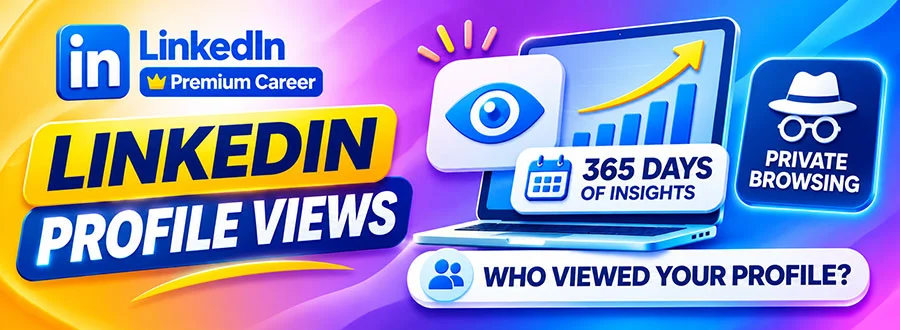
The linkedin premium career subscription provides additional information about people who have viewed your profile, including viewer trends and access to historical information covering up to 365 days.
A free account provides more limited profile-view information.
3.1 Understanding Profile Visitors
Knowing who has visited your profile can help you recognize potential professional interest.
For example, if someone working in recruitment at a company you recently applied to views your profile, that information may be useful.
Similarly, repeated visits from professionals in your target industry could indicate that your profile is attracting relevant attention.
However, a profile visit does not necessarily mean someone wants to recruit you. Visitors may include recruiters, colleagues, business owners, competitors, or people who discovered your profile through search.
The important thing is to interpret the information carefully.
3.2 Anonymous Profile Browsing
Premium members can also browse profiles anonymously using the available private browsing settings.
This can be useful when researching companies, recruitment professionals, hiring managers, or industry leaders.
For example, you may want to review the professional background of a hiring manager before sending an application.
Private browsing gives you more control over how your profile information is displayed to other members.
It is important to understand that anonymous browsing also affects your ability to see identifiable information about people who visit your profile.
3.3 How to Use Profile Insights Effectively
Instead of checking profile visitors repeatedly, use the information as part of a broader career strategy.
Consider these actions:
- Review whether visitors are connected to your target industry.
- Identify recruiters from companies where you want to work.
- Improve your headline if your profile attracts unrelated visitors.
- Update your experience and skills to reflect your current goals.
- Make meaningful professional connections when appropriate.
Profile visibility is valuable when it helps you take a relevant action, not simply when it gives you another number to monitor.
4. InMail: Contact Recruiters Outside Your Network
One of the most practical features for active job seekers is InMail.
Traditional LinkedIn messaging generally works best when communicating with first-degree connections. InMail provides a way to send direct messages to eligible members outside your immediate professional network.
The standard Premium Career allowance includes five InMail credits per month.
This is particularly useful when you identify a hiring manager or recruiter who is relevant to a specific vacancy.
4.1 How InMail Works
Imagine that you find an interesting job advertisement from a technology company.
You identify the recruitment professional responsible for hiring, but you are not connected with that person.
Instead of waiting for a connection request to be accepted, you may be able to use an InMail credit to send a direct message.
A good message should be short, professional, and relevant.
For example:
“Hello, I recently came across the SEO Specialist opportunity at your company. My experience includes technical SEO, keyword research, and content optimization. I would appreciate the opportunity to learn more about the position and its requirements.”
This approach introduces your professional background without overwhelming the recipient.
4.2 Making the Most of Five Monthly Credits
Five messages may sound limited, but the objective should be quality rather than quantity.
Before sending an InMail:
- Review the recipient’s professional background.
- Understand the company’s current hiring needs.
- Mention the specific position.
- Highlight one or two relevant qualifications.
- Include a clear and polite reason for contacting them.
Avoid generic messages that could be sent to hundreds of recruiters.
A thoughtful message is more likely to create a meaningful professional interaction than a long introduction filled with unrelated information.
4.3 Is InMail Worth Paying For?
For active job seekers who regularly identify relevant hiring professionals, InMail can provide genuine convenience.
However, it is not essential for everyone.
You can still connect with recruiters through regular connection requests, professional communities, shared connections, and public discussions.
The value depends on how frequently you need to communicate with people outside your existing network.
5. Message Proofreader and AI Writing Assistance
Communication is an important part of professional networking. A poorly written message can make even a qualified candidate appear less prepared.
LinkedIn includes message assistance features designed to help users refine their communication.
The Message Proofreader can help improve the clarity, tone, and structure of messages sent to recruiters or potential professional connections.
5.1 Improving Recruiter Messages
Consider two different approaches.
The first message is:
“Hi, I need job. Please check my profile and give me opportunity.”
The second message is:
“Hello, I noticed your company is recruiting for a digital marketing position. My experience includes SEO strategy and website optimization. I would be interested in learning more about the opportunity.”
The second version communicates professional interest more clearly.
Writing assistance can help identify wording that needs improvement, but it should not replace your own judgment.
5.2 Profile Writing Assistance
Another useful feature is profile-writing support.
Your LinkedIn headline, About section, and experience descriptions influence how recruiters understand your professional background.
For example, a headline such as “Looking for a Job” provides very little information.
A more descriptive headline might be:
“SEO Specialist | Technical SEO | Content Strategy | Website Optimization”
This communicates your expertise and helps relevant professionals understand your role.
The best approach is to use writing suggestions as a starting point and then personalize the content with your actual experience.
Avoid adding skills, qualifications, or achievements that you cannot demonstrate.
6. LinkedIn Learning: Professional Skill Development
Job searching is not only about finding vacancies. It is also about developing the skills required to compete for them.
LinkedIn Learning is one of the valuable additions included with the paid career membership.
It provides access to thousands of professional courses covering business, technology, creative skills, communication, management, and other career-related subjects.
6.1 What Can You Learn?
Depending on course availability, learning categories include:
- Digital marketing and SEO.
- Data analysis and reporting.
- Project management.
- Leadership and communication.
- Microsoft Excel and productivity.
- Graphic design and creative software.
- Programming and web development.
- Business strategy and professional development.
These resources can be helpful for both beginners and experienced professionals.
For example, someone working in digital marketing could explore courses about analytics, technical SEO, paid advertising, and content strategy.
6.2 Why Learning Matters During a Job Search
Recruitment requirements change as industries adopt new technologies and working methods.
A professional who regularly improves their skills may be better prepared for emerging responsibilities.
LinkedIn Learning can support this process by providing structured lessons rather than requiring you to search for separate learning resources.
However, completing a course does not automatically make someone an expert.
You should apply what you learn through practical projects, real assignments, and measurable results.
6.3 Are Learning Certificates Valuable?
Course completion certificates can demonstrate that you have completed particular learning activities.
You may add relevant certificates to your professional profile.
Nevertheless, employers generally consider practical experience, demonstrated abilities, and relevant qualifications alongside certificates.
Treat learning certificates as supporting evidence rather than a replacement for professional experience.
7. LinkedIn Premium Career Price: How Much Does It Cost?
Price is one of the biggest considerations when deciding whether to purchase a paid professional networking membership.
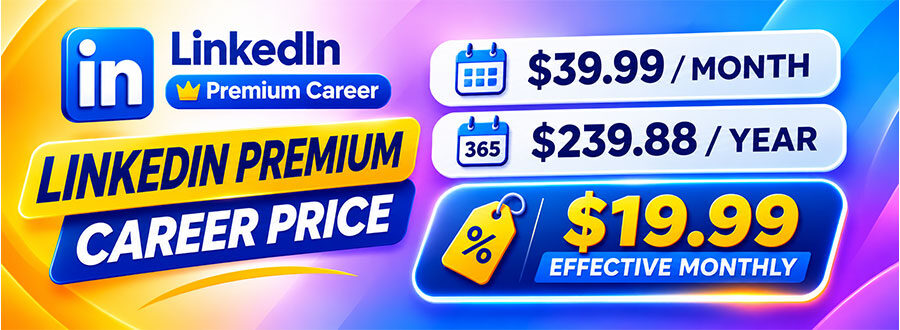
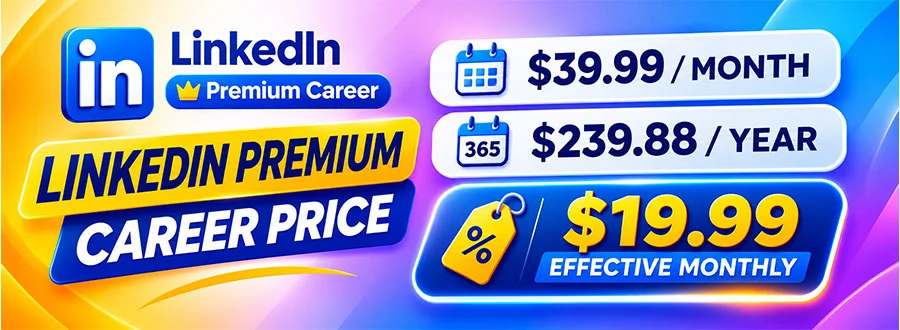
According to LinkedIn’s official pricing information, the individual US pricing starts at:
| Billing option | Price |
| Monthly subscription | $39.99 per month |
| Annual subscription | $239.88 per year |
| Effective monthly annual cost | $19.99 per month |
The annual option represents a substantial saving compared with paying the monthly price for twelve consecutive months.
However, the actual amount can vary depending on your country, currency, applicable taxes, promotions, and billing method.
For example, LinkedIn publishes different starting prices for users in the United States, United Kingdom, Canada, Australia, and European markets.
People in Bangladesh should check the final amount displayed in their own LinkedIn account before purchasing.
7.1 Monthly vs Annual Billing
Choosing between monthly and annual billing depends on how long you expect to use the additional features.
Monthly billing
This option is suitable for someone who wants to use Premium during a focused job-search period.
For example, if you are planning to apply for positions over the next two months, a monthly subscription may provide enough time to evaluate the benefits.
The main advantage is flexibility.
Annual billing
Annual billing is more suitable for professionals who expect to use the tools throughout the year.
This may include people who are actively exploring career opportunities, developing skills, or regularly connecting with recruiters.
The lower effective monthly cost is attractive, but paying for an entire year only makes sense when you expect to use the features consistently.
7.2 Does the Price Change by Country?
Yes. LinkedIn uses localized pricing, so the amount shown to one user may differ from the amount shown to another.
The final price can also depend on taxes and promotional eligibility.
You should therefore avoid relying entirely on screenshots, older reviews, or prices published by third-party websites.
Always verify the amount directly through the official subscription page before entering payment information.
8. Free Trial: Can You Try It Before Paying?
LinkedIn may offer eligible users a free trial of its Premium membership.
The availability and duration of the trial can vary depending on your location, account history, and promotional eligibility.
A trial is useful because it allows you to explore the additional features before committing to a paid subscription.
However, you should understand the billing conditions.
8.1 Important Things to Check Before Starting
Before activating a trial, review the following:
- Whether your account qualifies for the offer.
- How long the trial period lasts.
- Whether payment information is required.
- The date when paid billing begins.
- The amount that will be charged after the trial.
- The cancellation instructions.
Many subscription trials automatically convert into paid memberships when the trial ends unless you cancel beforehand.
Do not assume that closing the application or simply stopping your usage will cancel the subscription.
8.2 How to Evaluate the Trial Properly
Rather than activating a trial and browsing randomly, create a short evaluation plan.
During the trial period:
- Improve your LinkedIn headline and About section.
- Identify relevant vacancies using job insights.
- Review potential recruiters and hiring managers.
- Use your InMail credits strategically.
- Complete relevant LinkedIn Learning courses.
- Monitor profile visits and professional engagement.
At the end, evaluate whether the additional features helped you achieve meaningful progress.
This makes it easier to decide whether continuing with a paid membership is worthwhile.
9. Advantages of LinkedIn Premium Career
The subscription has several advantages, especially for people who actively manage their professional development.
9.1 Better Job Search Information
Additional applicant insights and job-related information can help candidates make more informed application decisions.
Instead of relying only on job titles, you can examine how a vacancy aligns with your experience.
9.2 Direct Communication Opportunities
InMail makes it possible to contact selected professionals outside your existing network.
This can be particularly helpful when you identify a relevant recruiter or hiring manager.
9.3 More Detailed Profile Visitor Insights
Historical profile-view information can help you understand which professionals are discovering your profile.
It may also help you identify opportunities to develop relevant connections.
9.4 Access to Learning Resources
LinkedIn Learning provides a broad collection of educational resources that can support professional development.
This is especially useful when you want to develop additional skills without purchasing separate courses.
9.5 Improved Professional Communication
Writing assistance can help refine messages and improve the overall presentation of your professional profile.
It is particularly useful for people who are not confident writing formal recruitment messages.
9.6 More Focused Career Planning
The combination of job insights, professional communication, and learning resources can make career development more structured.
Instead of treating job searching as a series of random applications, you can build a more organized process.
10. Disadvantages and Limitations
Although the features are useful, there are several limitations worth considering before purchasing.
10.1 No Guarantee of Employment
The biggest limitation is that a paid membership cannot guarantee an interview, job offer, or successful career transition.
Recruiters still evaluate applicants based on their qualifications, experience, communication, and suitability.
10.2 Limited InMail Credits
Five monthly InMail credits may be sufficient for selective communication, but they are not unlimited.
People who need extensive prospecting or frequent professional outreach may find the allowance restrictive.
10.3 Some Features Are Available for Free
Many important LinkedIn activities do not require a paid account.
You can create a professional profile, build connections, participate in discussions, browse job advertisements, and submit applications using the free version.
This means the additional membership may not offer enough value for someone with simple networking needs.
10.4 Job Insights Are Not Perfect Predictions
Applicant comparisons and job recommendations are useful reference points, but they do not represent the complete recruitment process.
An employer may prioritize qualifications, practical experience, location, salary expectations, or industry knowledge that cannot be fully reflected in a platform-generated comparison.
10.5 Subscription Costs Can Add Up
Even when annual billing provides savings, the subscription remains an expense.
For unemployed individuals or recent graduates, spending money on a tool without a clear usage plan may not be financially sensible.
10.6 Learning Requires Personal Effort
Access to professional courses does not automatically improve your career.
You still need to study, practice, complete projects, and demonstrate the skills you acquire.
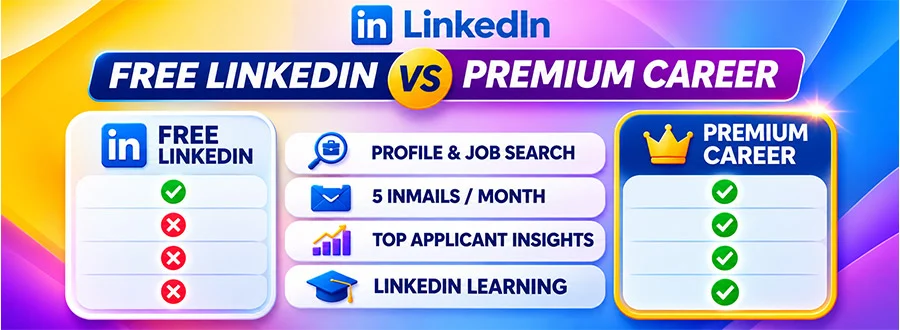
11. Free LinkedIn vs Premium Career: Which Is Better?
Choosing between the free account and a paid membership depends on your goals.
| Feature | Free LinkedIn | Premium Career |
| Professional profile | Yes | Yes |
| Job search | Yes | Yes |
| Job applications | Yes | Yes |
| Professional connections | Yes | Yes |
| Basic profile views | Limited | Extended insights |
| InMail messages | Not included as a monthly Premium allowance | 5 per month |
| Top Applicant insights | No | Yes |
| Top Choice jobs | No | Yes |
| Advanced career search filters | Limited | Additional filters |
| LinkedIn Learning | Not included | Included |
| Profile writing assistance | Limited | Included |
| Message Proofreader | No | Included |
The free account is sufficient for basic professional networking and job applications.
The paid option is more suitable when you need additional career insights, recruiter communication, and learning resources.
11.1 When the Free Version Is Enough
Continue using a free account if:
- You already have a strong professional network.
- You are not actively searching for a new position.
- You rarely need to contact people outside your network.
- You already have access to suitable learning resources.
- You are satisfied with your current job-search process.
There is no reason to purchase a subscription simply because other professionals are using one.
11.2 When Premium Makes More Sense
A paid membership may be worthwhile if you are actively searching for employment and regularly use the additional features.
For example, someone applying to international companies may benefit from reviewing job insights, contacting recruiters, and improving their professional skills.
The key consideration is whether those tools solve actual problems in your current job-search process.
12. Who Should Buy LinkedIn Premium Career?
The value of the subscription depends on the user’s professional situation.
Recent Graduates
Recent graduates often have limited professional experience and need to identify entry-level opportunities.
Additional job insights and learning resources may help them understand employer expectations and improve their applications.
However, they should focus equally on building practical experience through internships, personal projects, and relevant training.
Experienced Professionals
Professionals with several years of experience may find the additional features useful when exploring better positions.
They can use recruiter communication, job insights, and profile information to support a more targeted career move.
Career Changers
People moving into a different industry often need to understand new job requirements and identify transferable skills.
Learning resources and job-related insights can help them prepare for this transition.
Remote Job Seekers
Remote employment opportunities attract candidates from different countries and professional backgrounds.
Applicants competing for international positions may benefit from additional research and more direct communication with hiring professionals.
Professionals Building Their Skills
People who want to improve their professional knowledge may find the learning resources valuable even when they are not immediately applying for jobs.
However, purchasing a subscription solely for occasional learning may not be necessary if other educational resources already meet their needs.
13. Who Should Avoid Paying for It?
Not everyone needs a paid membership.
People who primarily use LinkedIn to publish updates, maintain professional relationships, or communicate with existing connections can often accomplish these activities without upgrading.
It may also be unnecessary for someone who has already secured a suitable position and does not expect to search for another opportunity soon.
Similarly, candidates who do not intend to use InMail, job insights, profile visitor information, or LinkedIn Learning may struggle to justify the recurring expense.
A subscription should solve a specific problem.
If you cannot identify which additional feature will improve your professional activities, starting with the free account is a sensible decision.
14. Practical Tips to Get Better Results
Even the best professional tools require an effective strategy.
If you decide to try the paid features, consider the following practices.
14.1 Optimize Your Profile Before Applying
Your profile should communicate your professional identity clearly.
Use a relevant headline, write a useful About section, and describe your experience with measurable achievements.
For example, instead of writing “Responsible for SEO,” explain which activities you handled and what outcomes you contributed to.
14.2 Apply to Relevant Positions
Do not submit applications simply because a vacancy is available.
Read the requirements, compare them with your experience, and identify whether the position matches your professional goals.
Quality applications are generally more useful than large numbers of poorly targeted applications.
14.3 Personalize Every Recruiter Message
Avoid copying the same message to different recruiters.
Mention the specific company, position, and relevant experience.
A personalized message demonstrates that you understand why you are contacting that individual.
14.4 Use Learning Resources With a Clear Goal
Choose courses based on the skills required for your target position.
If you want to work in digital marketing, focus on relevant areas such as analytics, search engine optimization, advertising, and content strategy.
After completing a course, try applying the knowledge to a real project.
14.5 Track Your Job Search Progress
Maintain a simple spreadsheet containing:
- Company name.
- Position title.
- Application date.
- Recruiter information.
- Application status.
- Follow-up date.
- Notes from conversations.
This helps you manage applications more effectively and reduces the possibility of forgetting important follow-ups.
14.6 Review Your Subscription Regularly
Do not continue paying automatically without evaluating its usefulness.
At the end of each billing period, review how often you used the features and whether they contributed to your career goals.
If you no longer need the additional tools, consider cancelling before the next renewal.
15. Is LinkedIn Premium Career Worth It in 2026?
The answer depends on your current career priorities and how effectively you use the available tools.
For an active job seeker, the combination of job insights, InMail credits, profile visitor information, and professional learning resources can provide useful support.
The biggest advantage is having additional information and communication options within the same professional platform.
However, the subscription should not be confused with a shortcut to employment.
A strong professional profile, relevant qualifications, practical experience, thoughtful applications, and effective communication remain essential.
If you are expecting a paid membership to generate interviews without improving your profile or application strategy, you may be disappointed.
On the other hand, if you already have a clear career direction and know how to use the available features, the additional tools may help you work more efficiently.
My Final Verdict
The linkedin premium career plan is a useful option for professionals who are actively searching for employment, exploring career changes, or trying to improve their professional visibility.
Its strongest features are job-related insights, five monthly InMail credits, extended profile-view information, and LinkedIn Learning access.
However, its monthly price may be difficult to justify for people who only need basic networking and job-search functionality.
My recommendation is to start by improving your free LinkedIn profile and establishing a clear job-search strategy. If you need more advanced information or direct communication with recruiters, consider testing the paid features through an eligible free trial.
A linkedin premium career subscription is most valuable when you use its features consistently and have a clear purpose for each one.
Ultimately, the platform provides additional tools, but your professional experience, preparation, and ability to demonstrate your value will determine how successfully you use them.
16. Frequently Asked Questions (FAQs)
What is LinkedIn Premium Career used for?
It is a paid LinkedIn membership designed for job seekers and professionals who want additional job-search insights, recruiter communication options, profile-view information, writing assistance, and access to LinkedIn Learning.
How much does LinkedIn Premium Career cost?
The published US starting price is $39.99 per month or $239.88 per year. Actual prices vary by country, currency, applicable taxes, and promotional offers. Always check the final price in your account.
Is LinkedIn Premium Career worth it for job seekers?
It can be worthwhile for active job seekers who use job insights, InMail, profile visitor information, and learning resources. People who only need basic networking may find the free version sufficient.
How many InMail messages do you get each month?
The standard Premium Career membership includes five InMail credits per month. These can be used to contact eligible LinkedIn members outside your immediate network.
Does LinkedIn Premium Career guarantee a job?
No. It provides additional tools and insights, but it does not guarantee interviews, employment, or positive responses from recruiters.
Can I use LinkedIn Premium Career for free?
Eligible members may receive a free trial. Availability and trial duration depend on account eligibility, location, and promotional conditions. Check the cancellation and renewal terms before activating it.
Can I cancel my Premium subscription?
Yes. You can manage or cancel your subscription through LinkedIn’s Premium account settings. Your access generally continues until the end of the current billing period, subject to the applicable subscription terms.
Does Premium Career include LinkedIn Learning?
Yes. The membership includes access to LinkedIn Learning courses and additional learning-related resources while the subscription remains active.
Is Premium Career better than Premium Business?
They serve different purposes. Career focuses on job searching and professional development, while Business provides tools for business networking, company insights, and professional growth. Choose according to your primary objective.
Can recruiters see that I have Premium?
Premium membership may provide a Premium profile badge, depending on your settings. You can review your profile visibility and badge preferences through your account settings.
Conclusion
Choosing a professional subscription should be based on practical needs rather than the number of features advertised.
LinkedIn provides a useful set of additional resources for people who want to improve their job-search process, connect with recruiters, and develop relevant skills.
Before spending money, identify the features you genuinely need and compare their benefits with the subscription cost.
For active job seekers who use the tools strategically, the additional functionality can be helpful. For everyone else, a well-optimized free profile may be more than enough.
The best career investment is still developing valuable skills, building meaningful professional relationships, and consistently demonstrating what you can contribute to an employer.


