
Can LinkedIn Premium See You in Private Mode?
can linkedin premium see anonymous profile visitors? No. LinkedIn Premium cannot reveal the identity of someone who viewed a profile using full Private Mode. The visitor appears anonymously, even when the profile owner pays for Premium. Readers asking can linkedin premium see anonymous visits should focus on the selected viewing option. This distinction matters because LinkedIn offers more detailed visitor insights to paying members, but those insights do not override another person’s privacy choice.
The Short Answer: Can Premium Members Identify Private Visitors?
For anyone asking can linkedin premium see private mode visitors, LinkedIn’s official guidance is clear: full Private Mode hides your name and identifying profile details from the person whose profile you visit. A paid account does not provide a secret list of private viewers, and upgrading afterward does not unlock their identities.
A Premium member can receive additional information about identifiable visitors, depending on the available plan features and each visitor’s settings. That is useful for networking and outreach. It is not a workaround for full private browsing. Think of Premium as expanding the information LinkedIn is permitted to show, rather than giving the subscriber unrestricted access to every person’s browsing activity.
What the Profile Owner Actually Sees
When you use full privacy, LinkedIn generally labels your visit as a private member instead of displaying your name, photo, headline, or profile link. The owner may know an anonymous visit occurred. They cannot establish from that entry alone who made it.
How LinkedIn Profile Viewing Options Work
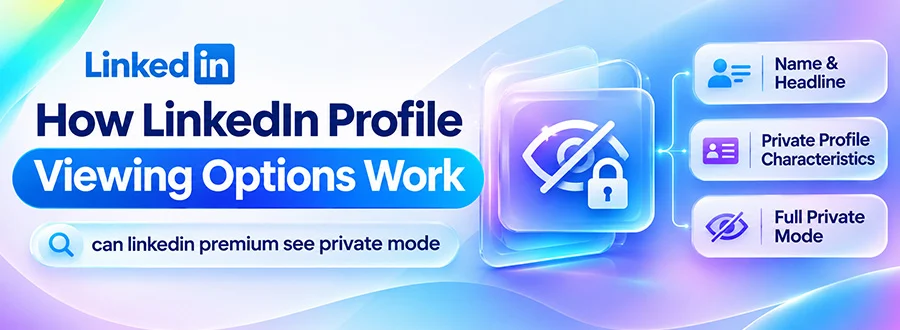
LinkedIn provides three principal profile-viewing options. They control how you appear when you open another member’s profile. Understanding them is more valuable than memorizing which subscription includes which reporting feature.
1. Your Name and Headline
This is the most open choice. The profile owner may see your name, headline, photograph, and a link to your account when LinkedIn displays your visit. Visibility can make professional discovery easier. A hiring manager may recognize a candidate who viewed their page, and a potential customer may decide to connect after noticing relevant interest.
However, public viewing can be awkward when you are researching sensitive career options or comparing competitors. If you want discretion, check your setting before opening the profile. Changing it later should not be treated as a guaranteed way to erase an earlier identifiable visit.
2. Private Profile Characteristics
For readers wondering can linkedin premium see private mode, distinguish semi-private visibility from full privacy. This middle option conceals your name while potentially showing broad characteristics, such as your industry, role, or other general profile descriptors. The exact information shown can vary. It offers partial discretion, not the same protection as fully anonymous browsing.
A distinctive job description could give someone enough context to suspect your identity. For example, if there are only a handful of people in a specialized industry, even an unnamed description may be revealing. People asking can linkedin premium see private mode sometimes overlook this crucial difference between semi-private and completely private viewing.
3. Full Private Mode
With linkedin private mode selected, the owner sees an anonymous entry rather than your identity and professional attributes. Using linkedin private mode is the clearest way to protect your identity in that report. This is the appropriate setting when you do not want a profile visit attached to your account in the owner’s visitor report.
Full Private Mode affects your profile-viewing identity, not every action you take on LinkedIn. It does not turn comments, reactions, connection requests, or direct messages into anonymous activities. You should therefore distinguish quietly viewing someone’s profile from actively interacting with that person.
LinkedIn Free vs Premium: What Changes?
A frequent misconception is that paying for LinkedIn unlocks the ability to unmask everybody. In reality, Basic and Premium members are both subject to the visitor’s visibility choice. Premium can enhance reporting about viewers who have chosen to be identifiable, but it does not change the fundamental privacy boundary.
| Feature | Basic Account | Premium Account |
| View profiles using full Private Mode | Yes | Yes |
| Reveal the name of a full-private visitor | No | No |
| Access viewer information | Limited and subject to settings | Expanded, subject to plan and settings |
| Browse privately while retaining access to viewer insights | Generally restricted | Available under Premium rules |
| Make reactions or messages anonymous | No | No |
The important question is not simply can linkedin premium see anonymous activity. It is what kind of activity you mean. Premium’s viewer tools concern profile visits, while visible engagement follows separate rules. Even rich visitor analytics cannot transform an anonymous view into a named contact.
Why Premium Viewer Insights Still Matter
These opportunities depend on users sharing enough information to be recognized. An anonymous viewer cannot reliably be converted into a named sales lead through LinkedIn’s profile-view feature. Treat the data as a useful signal, not a complete record of every person who considered your profile.
Does Premium Show More Than a Free Account?
Yes, it may provide more extensive access to viewer information and related insights. But when someone asks can linkedin premium see private mode, the meaningful answer remains no for the identity of a full-private visitor. More history, filters, or analysis does not equate to permission to reveal that protected identity.
How to Turn On Private Browsing on LinkedIn
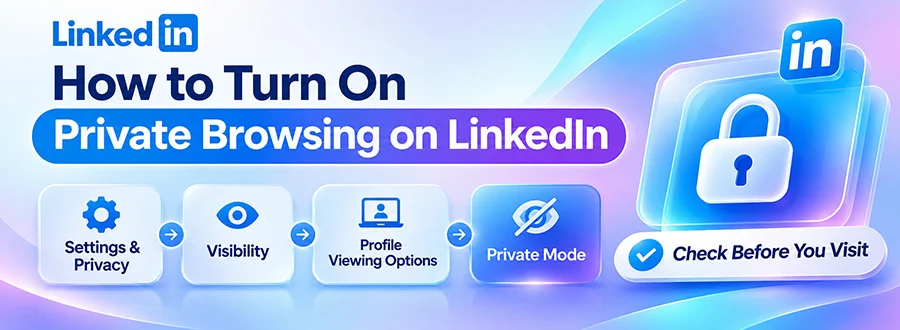
You do not need a paid subscription to browse anonymously. The setting is available to LinkedIn members using standard accounts as well. The menu labels may shift slightly between desktop and mobile versions, but the underlying choice is similar.
On a Desktop Browser
- Sign in to LinkedIn and open the Me menu near your profile picture.
- Select Settings & Privacy.
- Open Visibility.
- Find Profile viewing options.
- Choose Private mode rather than the semi-private characteristics option.
- Return to browsing after confirming your selection.
Before visiting a sensitive profile, revisit this menu if you have recently changed devices or experimented with privacy settings. Checking first is more reliable than assuming the preference is currently active.
On the LinkedIn Mobile App
- Open the LinkedIn app and tap your profile picture.
- Choose Settings, then Visibility.
- Select Profile viewing options.
- Tap Private mode.
- Verify the selection before viewing the desired profile.
How to Check Whether Your Setting Is Correct
The simplest method is to inspect the selected choice under Profile viewing options. Do not rely on browser incognito mode as a substitute. Incognito mainly controls local browser storage and session behavior; LinkedIn’s own profile-viewing preference determines what the profile owner sees when you are signed in.
If your goal is confidential research, linkedin private mode should be enabled before the visit. It is also wise to avoid public interactions that could indirectly connect you with the page you examined.
Can Someone Tell You Visited Their LinkedIn Profile?
Under full Private Mode, LinkedIn does not disclose your identity through its profile-viewer display. That protection applies regardless of whether the owner uses a free account or Premium. Yet privacy does not prevent people from noticing other clues outside the visitor list.
Suppose you read someone’s profile anonymously, then send a connection request explaining that you liked their recent career update. The person may reasonably infer that you examined their page. LinkedIn has not exposed the private visit; your own message gave away your interest.
Likewise, commenting on an article or liking an update can create visible engagement. Do not interpret anonymous browsing as an all-purpose shield against recognition. The platform’s privacy control is specific to how profile views are reported.
What if the Other Person Has Premium?
People often search can linkedin premium see anonymous because the other person’s paid subscription feels like a more powerful tracking tool. LinkedIn explicitly says Premium owners cannot see the names of people browsing their profiles in full private mode. There is no legitimate Premium setting that reverses that choice.
This applies whether the profile belongs to a recruiter, manager, founder, or former coworker. Their professional importance does not change the visibility rule. Your selected viewing mode is the deciding factor for how your visit appears in the normal viewer interface.
Can They See When an Anonymous Visit Happened?
A viewer report may reflect anonymous viewing activity without supplying the individual’s identity. Reporting details and timing depend on the product interface and available insights. Even if someone notices a private visit around a particular time, the anonymous label does not prove which person visited.
That is why the question can linkedin premium see private mode needs a precise answer: a visit may be represented, but the visitor’s name is not revealed. Hiding identity is different from removing every trace that a profile was viewed.
What Happens to Your Own Viewer History?
Private browsing has a trade-off, especially on a Basic account. LinkedIn generally restricts access to your own Who’s Viewed Your Profile information when you select private viewing. The idea is reciprocal: if you choose to conceal your identity while browsing, some visibility into your own visitors becomes unavailable.
LinkedIn states that Premium subscribers can browse privately while continuing to access their available visitor list, subject to viewers’ privacy choices. This is a practical reason to consider Premium if seeing inbound professional interest is important to your strategy.
Still, the benefit has limits. A Premium member can review identifiable visitors and appropriate insights, but private visitors remain unnamed. If you switch between settings, do not assume previously unavailable information will automatically become recoverable.
Is Private Browsing Worth the Trade-Off?
It depends on your purpose. A person quietly evaluating employers may value discretion more than knowing who checked their page. A recruiter who wants to be discovered might prefer an identifiable presence. Someone prospecting for clients may switch deliberately between research and relationship-building activities.
Use linkedin private mode when confidentiality matters, and open browsing when you want the other person to notice you. Neither option is universally superior. The best setting is the one that matches your immediate professional goal and your tolerance for being recognized.
Common Myths About Premium and Anonymous Viewing
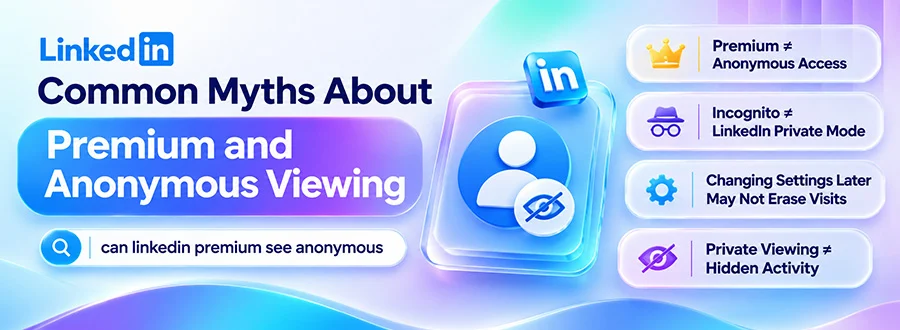
Conflicting advice circulates because users mix together old LinkedIn features, browser privacy tools, semi-private browsing, and third-party applications. A few simple distinctions resolve most of the confusion.
Myth: Premium Reveals All Anonymous Profiles
False. If you are wondering can linkedin premium see anonymous profile identities, the official answer is no. The phrase can linkedin premium see anonymous should never be confused with a promise of identity disclosure. Premium provides additional access to eligible viewer information, not a master key that defeats fully private viewing.
Myth: Incognito Browsing Is the Same as Private Mode
False. A browser’s incognito window can reduce information stored on your device, but it does not automatically choose LinkedIn’s anonymous viewing option for a logged-in session. You must check your LinkedIn profile-viewing setting independently.
Using incognito while signed in with public viewing enabled may still create an identifiable profile visit. Browser privacy and platform visibility solve different problems, so they should not be used interchangeably.
Myth: Changing Settings Later Erases Everything
Do not depend on this assumption. The safest practice is to choose the desired setting before opening a profile. LinkedIn’s documented privacy rules describe how browsing in each mode appears; they do not promise that switching afterward will retroactively remove identifiable information that was already shown.
Myth: Anonymous Viewing Hides All LinkedIn Activity
False. Your profile visits and your social interactions are different activities. Messages, follows, invitations, comments, and reactions may be visible according to their respective settings. Private viewing is not a universal invisibility feature.
Before undertaking sensitive research, think about the entire sequence: profile visit, subsequent engagement, and any outside communication. That broader awareness is more useful than focusing on the visitor report alone.
When Should You Use Private Mode?
Anonymous profile research can support perfectly ordinary professional tasks. It allows people to gather context without turning every visit into a networking signal. Here are situations where discretion may be particularly useful.
Researching a Potential Employer
Job seekers sometimes explore hiring managers, team leaders, or current employees before applying. They may want to understand a company’s culture and team structure without announcing their interest too early. Private viewing makes that preliminary review less conspicuous.
Once ready to connect, they can switch to a more open approach and send a thoughtful, relevant message. An anonymous visit does not prevent later outreach; it simply keeps the initial research separate from the introduction.
Reviewing Competitors or Industry Leaders
Business owners and marketers routinely study competing services, messaging, and professional backgrounds. Viewing publicly may be acceptable, but discretion can be useful when researching a new market or preparing a sensitive business initiative.
Preparing for Sales Conversations
Sales professionals benefit from understanding a prospect’s role, experience, and company priorities before reaching out. Quiet research can make a first conversation more relevant, provided the eventual outreach is transparent and respectful.
For lead generation, linkedin private mode can protect early-stage exploration, but it also removes the possible benefit of a prospect noticing your name in their viewer list. Decide whether discretion or discoverability better supports the relationship you want to build.
Can You Identify Your Own Anonymous Visitors?
If someone has visited your profile using full privacy, you cannot use Premium to obtain their name from that visitor entry. This remains true even if you suspect the person is a recruiter, prospective employer, or business competitor.
People searching can linkedin premium see private mode often mean the opposite question: can they reveal an anonymous visitor to their own profile? The rule is symmetrical. Each viewer controls their viewing identity, and the profile owner cannot purchase an exception.
Instead of chasing hidden identities, improve what identifiable visitors see when they reach your page. A clear headline, relevant experience, credible recommendations, and useful featured content give genuinely interested people a reason to contact you directly.
Better Ways to Understand Profile Interest
Look for patterns in the information that LinkedIn legitimately provides. Profile-view trends, engagement with posts, connection invitations, and direct inquiries can help you assess whether your professional positioning is working. None of these signals should be treated as proof of who made a particular anonymous visit.
Privacy Best Practices for Everyday LinkedIn Use
Privacy is easier to manage when it becomes a habit rather than an emergency adjustment. Review your visibility settings periodically, especially before researching people connected to a job change, confidential project, or commercially sensitive opportunity.
Use strong account security, consider two-step verification, and review what information your public profile reveals. Profile viewing is only one dimension of privacy; contact details, activity visibility, and public content deserve attention too.
Be cautious about browser extensions that request extensive LinkedIn access. A tool claiming to answer can linkedin premium see anonymous by exposing hidden people is contradicting LinkedIn’s published privacy guidance. Evaluate permissions carefully and avoid sharing login details with unfamiliar services.
Frequently Asked Questions
Can LinkedIn Premium See Anonymous Profile Viewers?
No. The answer to can linkedin premium see anonymous viewers is that Premium does not reveal the identity of anyone who visited using full Private Mode. The owner may see an anonymous entry, but not the person’s name or profile details.
Can LinkedIn Premium See Private Mode Visitors?
No. For those asking can linkedin premium see private mode visitors, a paid subscription does not bypass the visitor’s chosen privacy setting. Premium analytics remain limited by that setting.
Does Private Mode Work Against Recruiters?
Yes. Recruiters and hiring managers are subject to the same profile-viewing privacy rules as other LinkedIn members. However, any message or interaction you initiate separately may still reveal your identity.
Can I Use Private Mode Without Premium?
Yes. You can select full private browsing with a Basic account. The main trade-off is reduced access to your own viewer information, while Premium members retain certain viewing insights under LinkedIn’s rules.
Can Someone See My Job Title in Private Mode?
Full Private Mode hides your identifying details in the visitor report. The semi-private characteristics option is different and may expose broad professional descriptors. Select full privacy if you want to avoid displaying those clues.
Does Private Mode Hide My Comments and Likes?
No. The setting controls how profile visits are shown. Your comments, reactions, invitations, and messages follow their own visibility rules, so consider them separately when planning discreet research.
Can I Tell Whether Someone Has LinkedIn Premium?
Some members display a Premium badge, but visibility of subscription status is not a reliable way to determine what another person knows about your visit. Their subscription cannot override your full-private viewing identity.
Is LinkedIn Private Mode Completely Invisible?
Not in every sense. linkedin private mode hides who you are in the profile-viewer report, but an anonymous visit may still be recorded or represented. Outside interactions can also provide clues about your interests.
Final Verdict: Does Premium Override Your Privacy?
The answer to can linkedin premium see anonymous profile visitors is no: LinkedIn Premium cannot identify people who browse in full Private Mode. Premium offers enhanced insights about eligible profile visitors, but it respects the privacy settings selected by those visitors.
If your goal is discreet research, switch to full Private Mode before viewing a profile, not afterward. If your goal is networking and discovery, public viewing may create useful opportunities for recognition. Understanding that choice gives you more control over how you use LinkedIn, whether your account is free or paid.
For authoritative guidance, read LinkedIn’s Private mode viewers of profiles, Profile viewing options, and Who’s viewed your profile visibility settings. These official resources are the best place to verify current platform behavior.


