
Is LinkedIn Verification Safe? What Happens to Your ID Data
Is linkedin verification safe when you’re asked to upload a government-issued ID, scan your passport, or complete a facial recognition check? It’s a reasonable question, especially when your professional identity and sensitive personal information are involved.
LinkedIn verification is designed to help members establish trust by confirming certain details about their identity or workplace. However, sharing identification documents online naturally raises questions about privacy, data storage, third-party access, and security.
You might wonder whether LinkedIn keeps a copy of your passport, whether verification providers store facial information, or whether someone could misuse your documents.
These concerns deserve clear answers rather than vague promises about online safety.
The important thing to understand is that verification methods differ. Some involve government identification, while others use workplace credentials or approved identity systems. Each method may have different data-handling practices.
This guide explains how LinkedIn verification works, what happens to your information, which privacy concerns deserve attention, and how to recognize fraudulent verification requests.
You’ll also learn how to make an informed decision before submitting sensitive information.
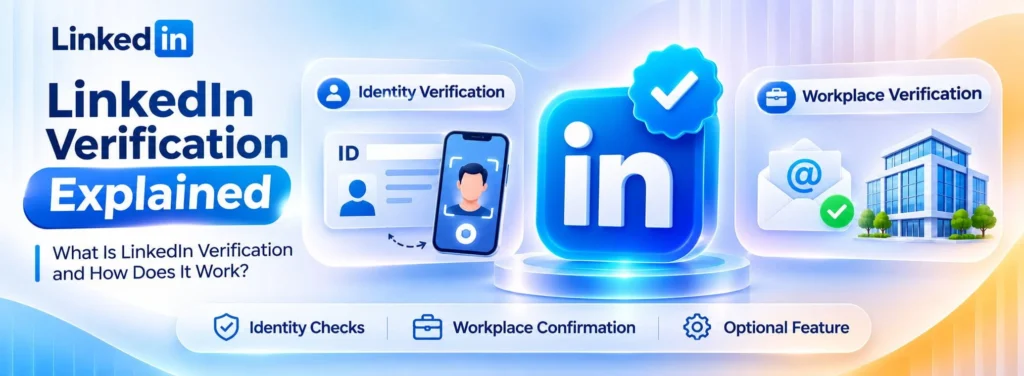
What Is LinkedIn Verification and How Does It Work?
Before answering is linkedin verification safe, it’s important to understand what the process actually involves.
LinkedIn offers verification features that allow eligible members to confirm certain professional identity details through supported methods.
Depending on availability, these may include identity verification through an authorized provider or workplace verification through an eligible organization.
The purpose is to provide an additional signal that a profile represents a real professional or that a particular workplace association has been confirmed.
However, verification does not mean LinkedIn has independently validated every qualification, employment claim, or statement displayed on a profile.
Understanding Identity Verification
Identity verification may require members to provide an eligible government-issued document and complete additional identity checks.
Depending on the provider and country, this might involve scanning a passport, capturing document images, or taking a live selfie.
Some methods may also use electronic document-reading technology.
The provider evaluates the information according to the requirements of the particular verification process.
If verification succeeds, LinkedIn can display the relevant confirmation on the member’s profile.
Understanding Workplace Verification
Workplace verification follows a different approach.
Instead of requiring government identification, eligible members may confirm their association with an organization through an approved work email address or employer-supported system.
For example, an employee might receive a verification message through their company email account.
Other organizations may support verification through compatible identity-management systems.
These methods can involve less sensitive information than government-ID verification, although they still require careful handling of account and employment details.
Does Every LinkedIn Member Need Verification?
No. Optional profile verification is not universally required for all LinkedIn members.
However, LinkedIn may separately request identity confirmation during certain account-security or recovery situations.
These two processes should not be confused.
A member who chooses not to obtain an optional profile verification indicator may still use LinkedIn, subject to the platform’s normal account requirements.
Is LinkedIn Verification Safe for Your Personal Information?
The question is linkedin verification safe cannot be answered responsibly with an unconditional yes or no.
LinkedIn provides legitimate verification processes through supported providers, but submitting personal identification online always involves some privacy and security considerations.
The level of exposure depends on the verification method, the information collected, the provider involved, and the applicable data-handling policies.
What Makes Official Verification Different?
Official verification begins through LinkedIn’s authorized website or application.
The process directs eligible members to supported verification methods and provides instructions for submitting the necessary information.
Depending on the method, an external provider may perform the identity check.
That provider may collect and process sensitive information to determine whether the verification requirements have been satisfied.
Using an official process reduces the risk of sending information to an impersonator, but it does not eliminate every possible privacy or security concern.
Can LinkedIn Verification Be Completely Risk-Free?
No online identity-verification process should be described as entirely risk-free.
Even reputable services face potential challenges involving cybersecurity, unauthorized access, data retention, and human error.
These possibilities do not establish that LinkedIn’s verification system is unsafe.
They simply explain why users should review privacy information before submitting sensitive documents.
What Should You Check Before Starting?
Review the verification method offered to your account.
Identify the organization responsible for processing your information.
Read the relevant privacy notice and check which categories of information will be collected.
Pay particular attention to retention periods, sharing arrangements, deletion options, and any biometric processing described.
If the information is unclear, consult the provider’s official documentation before continuing.
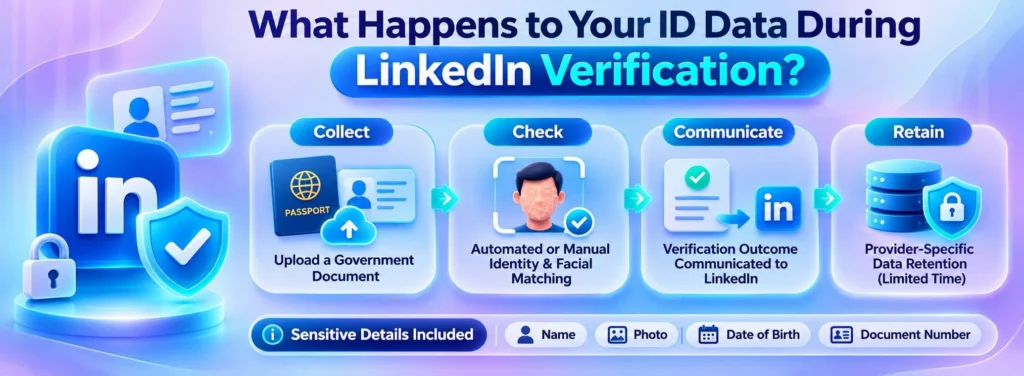
What Happens to Your ID Data During LinkedIn Verification?
Understanding how identification information is processed is essential when evaluating linkedin verification risks.
A government-issued document can contain your full legal name, photograph, date of birth, document number, nationality, and other identifying details.
These details are more sensitive than ordinary profile information because they may be difficult or impossible to change if exposed.
Step 1: Your Identification Information Is Collected
When you begin an eligible identity-verification process, the provider may request images or electronic information from a supported identification document.
The exact collection method depends on the provider.
Some verification experiences use camera-based document capture.
Others may require compatible electronic identification technology.
You should only submit the information specifically requested through the authorized process.
Step 2: The Provider Checks Your Identity
The verification provider may examine document authenticity, compare identifying details, or conduct a facial matching process.
Some methods may use automated analysis, while others can involve additional review.
If a selfie is required, the provider may compare the submitted image with the photograph on your identification document.
The technologies and procedures vary.
Not every verification method uses the same type of biometric processing.
Step 3: A Verification Result Is Communicated
After completing the required checks, the provider may communicate a verification result or relevant confirmation to LinkedIn.
The information shared depends on the particular integration and its privacy terms.
It is important not to assume that LinkedIn receives every image or document collected by the verification provider.
Likewise, you should not assume that no personal information is shared.
Review the current privacy disclosures for your specific method.
Step 4: Information May Be Retained According to Applicable Policies
One of the most important linkedin verification risks involves how long information remains stored.
Different providers may apply different retention periods to document images, verification records, and related information.
Some data may be deleted after a defined period, while other records may be retained for operational, legal, security, or compliance purposes.
The exact rules depend on the provider, jurisdiction, and verification method.
Never rely on a general statement claiming that all identity information is deleted immediately.
Does LinkedIn Store Your Passport or Government ID?
People asking is linkedin verification safe often want to know whether LinkedIn itself stores copies of their identification documents.
The answer depends on the specific verification process and how information is handled between LinkedIn and its authorized provider.
There is no reason to assume that every verification method follows an identical data-storage model.
LinkedIn and Third-Party Verification Providers
Some identity checks are performed by external verification services rather than entirely within LinkedIn’s own systems.
These providers may collect identification images and process them under their own applicable privacy notices.
LinkedIn may receive confirmation that the verification succeeded, along with other information specified by the relevant process.
However, the exact data exchanged should be checked against the current documentation.
What About Facial Recognition Information?
Facial verification can involve particularly sensitive information.
A provider may use a selfie, document photograph, or facial comparison technology to determine whether the person completing verification matches the submitted identification.
Depending on the technology, this may involve biometric data or information derived from facial images.
Privacy laws in some jurisdictions impose additional requirements on certain biometric processing activities.
Before agreeing, review whether biometric information is collected, how it is used, and how long it is retained.
Can You Request Data Deletion?
Deletion rights depend on the provider, applicable privacy laws, and the type of information involved.
Some information may be eligible for deletion upon request.
Other records may need to be retained for legitimate legal or security purposes.
Review LinkedIn’s privacy controls and the verification provider’s data-rights procedures.
If you want information removed, use the official privacy request channels rather than contacting an unrelated third party.
Is LinkedIn Verification a Scam or a Legitimate Feature?
Many professionals search is linkedin verification a scam after receiving unexpected emails or messages asking them to confirm their identity.
The distinction is important.
LinkedIn offers legitimate verification features, but scammers can impersonate LinkedIn or verification providers to steal sensitive information.
An official verification feature and a fraudulent message pretending to represent that feature are not the same thing.
Why Scammers Target Verification Processes
Identity verification creates an opportunity for attackers because people may expect to submit documents or follow security instructions.
A fraudulent message might claim that your account will be permanently deleted unless you verify immediately.
Another might promise a verification badge in exchange for payment.
Some scams direct users to websites designed to collect passwords, identification images, or authentication codes.
Warning Signs of Fake Verification Requests
Be cautious when a message creates extreme urgency or asks you to use an unfamiliar website.
Unexpected requests for your LinkedIn password, authentication codes, or payment details are particularly concerning.
Poor spelling alone does not prove fraud, and professional-looking design does not prove legitimacy.
Scammers can imitate branding, logos, and official communication styles.
How to Confirm a Verification Request Is Genuine
If you’re wondering is linkedin verification a scam, avoid relying solely on the link included in an unexpected message.
Open LinkedIn directly through its official website or application.
Check whether the verification request appears in your account.
Review the destination website and the identity of the provider involved.
If the request is connected to an account restriction, follow the instructions available through legitimate LinkedIn support channels.
Never submit identification documents to an unofficial service promising guaranteed verification.
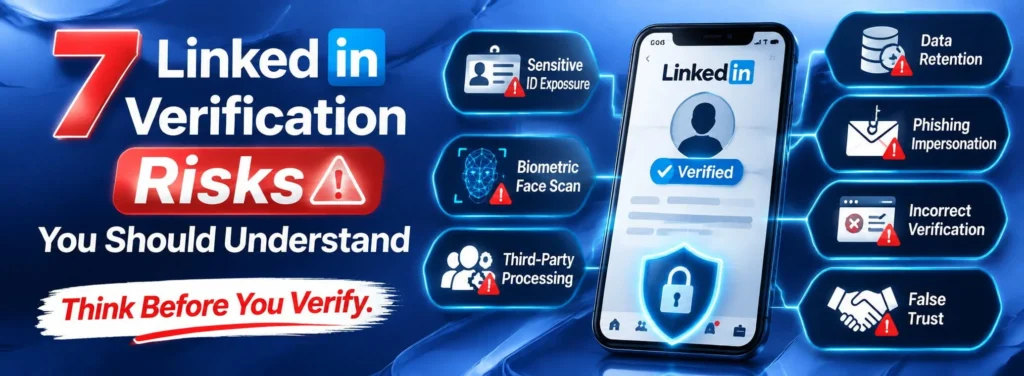
7 LinkedIn Verification Risks You Should Understand
Although official verification can provide useful identity confirmation, evaluating linkedin verification risks helps you make a more informed decision.
These concerns are not evidence that LinkedIn or its authorized providers have experienced a particular security failure.
They represent general considerations associated with sharing sensitive information through online verification services.
1. Exposure of Sensitive Identity Information
Government identification documents contain personal details that could be misused if accessed by unauthorized parties.
Unlike passwords, certain identity details cannot easily be replaced.
This makes careful document handling especially important.
Use only authorized verification channels and avoid keeping unnecessary copies of identification images on shared devices.
2. Potential Biometric Privacy Concerns
Facial verification may involve collecting or analyzing information derived from a person’s face.
Depending on the technology, this information can be particularly sensitive.
Review whether the provider uses facial comparison, liveness detection, or other biometric processing.
Understand the relevant consent, retention, and deletion provisions before proceeding.
3. Third-Party Data Processing
Some verification methods involve organizations outside LinkedIn.
This means your information may be processed under additional privacy policies.
A third-party relationship is not inherently unsafe, but it introduces another organization whose data-handling practices deserve attention.
Check the provider’s identity and official documentation.
4. Data Retention Beyond the Verification Session
Verification may take only a few minutes, but some records may be retained after the process ends.
Retention can serve operational, security, legal, or compliance purposes.
The relevant privacy notice should explain the applicable practices.
Do not assume that closing the verification page immediately removes every associated record.
5. Phishing and Impersonation Attempts
Fraudulent verification requests can trick users into revealing information to attackers.
This risk is especially relevant when someone is already worried about losing account access.
Always navigate to LinkedIn directly instead of trusting unexpected links.
6. Incorrect Verification Results
Automated identity checks are not perfect.
A valid document may be rejected because of technical issues, unsupported formats, or unsuccessful matching.
These errors can delay verification and create frustration.
Use the available retry, review, or support process rather than submitting inaccurate information.
7. Misunderstanding What Verification Guarantees
One of the less obvious linkedin verification risks is assuming that verified profiles are automatically trustworthy.
Verification may confirm identity or workplace information, but it does not guarantee honesty, professional competence, or legitimate business intentions.
Continue evaluating unfamiliar contacts carefully, even when their profiles display verification indicators.
How to Verify Your LinkedIn Account More Safely
If you’re still asking is linkedin verification safe, the most useful next step is to understand how to reduce avoidable exposure.
You cannot control every aspect of a verification provider’s infrastructure, but you can make informed choices about the process.
Use LinkedIn’s Official Website or Application
Start verification from your own LinkedIn account.
Avoid links sent by unfamiliar individuals, especially those promising immediate approval.
If an external provider opens during the process, confirm that it is the provider identified by LinkedIn.
Read the Privacy Notice Before Agreeing
Privacy notices may explain what information is collected, why it is needed, who receives it, and how long it may be retained.
Look for details about document images, facial data, verification outcomes, and data-subject rights.
If a policy is unclear, seek clarification before submitting sensitive information.
Choose the Least Intrusive Eligible Method
If LinkedIn offers several verification methods, consider which one meets your needs while requiring the least sensitive information.
For example, eligible workplace verification may not require uploading a government-issued document.
However, workplace verification confirms a different attribute from identity verification.
Choose based on what you need verified, not simply which method appears easiest.
Protect Your Device and Account
Use a trusted device with updated software.
Enable two-step verification and maintain a strong, unique LinkedIn password.
Avoid completing sensitive verification tasks on shared devices when possible.
Sign out of accounts on devices you do not control.
Keep Your Identification Documents Private
Never send your passport or national identification card through LinkedIn messages to someone claiming they can verify your account.
Do not post identification images publicly.
If verification requires a document capture, complete it only within the authorized process.
Avoid uploading additional documents that have not been requested.
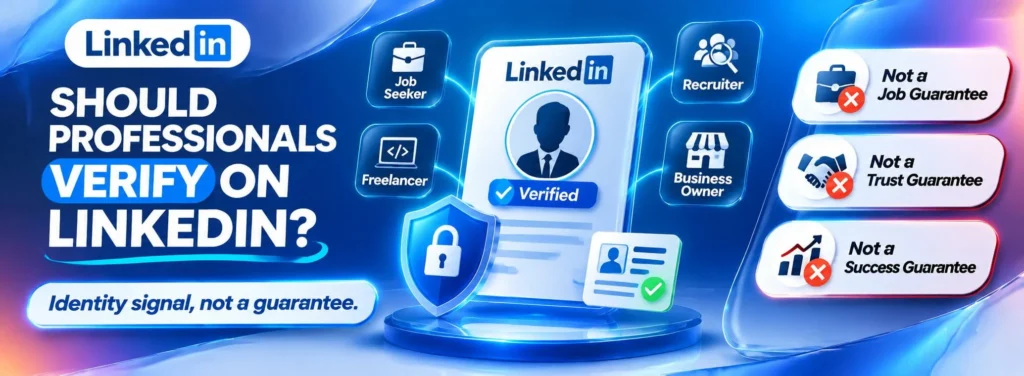
Is LinkedIn Verification Worth It for Professionals?
The decision depends on your professional needs and comfort with the relevant privacy practices.
For some members, verification provides useful confirmation when networking with unfamiliar professionals.
For others, the benefits may not justify submitting additional sensitive information, especially when the available method requires government identification.
Benefits for Job Seekers
Job seekers often communicate with recruiters and hiring managers who have never met them.
A verified identity may provide an additional signal of authenticity.
However, employers still need to assess experience, qualifications, and suitability independently.
Verification does not guarantee interviews or job offers.
Benefits for Freelancers and Consultants
Freelancers frequently build relationships with clients through online conversations.
Identity or workplace verification may help clarify who operates a professional profile.
Still, clients should review portfolios, references, contracts, and other relevant evidence before making decisions.
Benefits for Recruiters and Business Owners
Recruiters and business owners may find verification useful when establishing professional relationships.
However, verified status does not replace responsible outreach or transparent business practices.
The strongest professional reputation combines accurate information, respectful communication, and consistent performance.
When You Might Prefer Not to Verify
You may choose to postpone optional verification if you are uncomfortable with the available data-handling terms.
You might also wait if your preferred method is unavailable or if you need clarification about biometric processing.
An unverified LinkedIn profile can still be legitimate and professionally valuable.
Verification should be an informed choice whenever it is optional.
Frequently Asked Questions About LinkedIn Verification Safety
Is LinkedIn Verification Safe for Government-Issued IDs?
If you’re wondering is linkedin verification safe for passports and national identity cards, the answer depends on the verification provider and its data-protection practices.
Official verification uses supported processes, but submitting identification documents involves privacy considerations.
Review the provider’s security information, data-retention policy, and available privacy controls before proceeding.
Is LinkedIn Verification a Scam If It Asks for My Passport?
People asking is linkedin verification a scam often become concerned when a verification service requests government identification.
A passport request is not automatically fraudulent. Some legitimate identity-verification methods require eligible identification documents.
However, unexpected requests through private messages, unfamiliar websites, or unofficial email addresses should be treated cautiously.
Always confirm the request through LinkedIn’s official interface.
Does LinkedIn Keep My ID After Verification?
The answer depends on the verification method and the organizations processing your information.
Some providers may retain particular verification records according to their privacy policies.
Do not assume that every document image is permanently stored or immediately deleted.
Review the applicable retention terms and available deletion procedures.
What Are the Biggest LinkedIn Verification Risks?
The main linkedin verification risks include exposure of sensitive identification information, biometric privacy concerns, third-party processing, phishing attempts, and misunderstandings about data retention.
These are potential concerns rather than evidence of a specific security incident.
Using authorized services and reviewing privacy terms can help reduce avoidable exposure.
Is LinkedIn Verification a Scam When Someone Charges Money?
If you’re asking is linkedin verification a scam because someone offered guaranteed verification for a fee, be cautious.
LinkedIn’s standard profile verification features are free for eligible members.
An unrelated person promising instant approval in exchange for payment may be attempting fraud.
Avoid sharing your password, identification documents, or payment details with such services.
Can Someone Steal My Identity Through LinkedIn Verification?
The question is linkedin verification safe is particularly important when considering identity theft.
Any unauthorized exposure of sensitive identification information can create potential misuse risks.
However, that does not mean completing an official verification process automatically exposes you to identity theft.
The safer approach is to use authorized providers, protect your account, and avoid suspicious verification requests.
Is LinkedIn Verification a Scam If I Receive an Unexpected Email?
When evaluating is linkedin verification a scam, remember that fraudulent emails can imitate legitimate security notifications.
Do not trust a message solely because it displays LinkedIn branding.
Open LinkedIn directly and check whether the requested action appears in your account.
If you cannot confirm the message’s authenticity, avoid submitting personal information.
Can I Remove My LinkedIn Verification Later?
LinkedIn may provide controls for managing certain verification information displayed on your profile.
However, removing a visible verification indicator is not necessarily equivalent to deleting information previously processed by a verification provider.
Review LinkedIn’s current verification settings and the provider’s privacy procedures.
If necessary, submit an official data-deletion request, subject to applicable retention requirements.
Is LinkedIn Verification a Scam Compared With Other Social Media Verification?
The search is linkedin verification a scam sometimes reflects confusion about different platforms’ verification systems.
LinkedIn’s official identity and workplace verification features are legitimate.
However, verification systems differ between platforms, and their eligibility requirements should not be assumed to be identical.
Use LinkedIn’s own documentation when evaluating its verification features.
Final Thoughts: Should You Trust LinkedIn Verification?
So, is linkedin verification safe enough to justify sharing your identification information?
For eligible professionals, official LinkedIn verification provides a legitimate way to confirm certain identity or workplace details. However, the privacy implications depend on the verification method and the provider handling your information.
Understanding linkedin verification risks is essential before submitting sensitive documents. Review data collection practices, retention periods, biometric processing requirements, and deletion options.
If you’re wondering is linkedin verification a scam, remember that the official feature is legitimate, but fraudulent websites and impersonators can exploit verification-related concerns.
The safest decision is an informed one.
Use authorized verification methods, protect your account credentials, and never share identification documents with unofficial services.
Ultimately, is linkedin verification safe is a question you should evaluate based on your own privacy expectations, the available verification method, and the provider’s current policies.
A verification indicator can strengthen confidence in your professional identity, but protecting your personal information should always remain a priority.


